> For clean Markdown of any page, append .md to the page URL.
> For a complete documentation index, see https://docs.thymia.ai/llms.txt.
> For full documentation content, see https://docs.thymia.ai/llms-full.txt.
# thymia | Documentation
# thymia documentation

## The health and safety intelligence layer for voice
thymia extracts clinically validated health and wellbeing signals from
voice — not transcription, not sentiment analysis, but the biological
signal contained in sound, made actionable.
Voice sits at the intersection of five major biological systems —
respiratory, neurological, cardiovascular, metabolic, and
musculoskeletal. Change any one of them, and the voice changes with it.
Every voice contains thousands of measurable patterns: subtle variations
in pitch, rhythm, pauses, and tone. thymia calls the smallest distinct
units **neural morphemes™** — the fundamental building blocks of speech that
carry meaning beyond words.
thymia's foundational models identify these **neural morphemes™** in real
time, then combine them into biomarkers — specific signatures that
reliably indicate health and wellbeing states. Just as a doctor
recognises symptoms that together suggest a diagnosis, our models
recognise morpheme patterns that together reveal emotional, mental, and
physiological states. From just 15 seconds of speech, processed in
real time.
| Signal | Examples |
| ----------------------- | ------------------------------------------------------------ |
| **Acoustic features** | Pitch variation, speech rate, pauses, vocal tremor, loudness |
| **Linguistic patterns** | Word choice, sentence structure, semantic content |
| **Temporal dynamics** | Response timing, speech rhythm, prosody changes |
All capabilities are accessible through a REST API, designed to
integrate into any platform or workflow that handles voice.
## Choose your integration
thymia integrates into any platform or workflow that handles voice.
Whether you are building a remote patient monitoring tool, enriching an
existing voice agent, or embedding mental health screening into a
clinical pathway, thymia delivers biomarker-grade intelligence from
seconds of natural speech.
### thymia API
Supply voice recordings directly from your infrastructure.
Your backend creates a model run, uploads the recording, and polls for
results. Full control over the recording experience and user journey
from end to end.
### Sentinel
Real-time voice safety and wellbeing monitoring for AI agents.
Stream audio and transcripts, run safety policies, and get
actionable results — all without storing recordings.
## Choose your model
### Helios
#### Wellbeing and safety monitoring
Wellbeing monitoring from live voice. Detects distress, stress,
fatigue, low self-esteem, and burnout in real time — across
human and voice agent interactions — for healthcare, pharma,
and safety-critical industries.
### Apollo Clinical
#### Clinical-grade health detection
Voice-based depression and anxiety assessment covering all DSM-V
criteria with disorder-level results and granular symptom scores.
Apollo is a regulated medical device intended for qualified
healthcare professionals only.
***
# Models
thymia offers two voice biomarker models, each designed for a distinct
use case. Both analyse **neural morphemes™** extracted from natural speech
and return clinically validated scores. They differ in their intended
setting, output type, regulatory status, and recording requirements.
## Model overviews
### Helios
#### Wellbeing and safety monitoring
Wellbeing monitoring from live voice. Detects distress, stress,
fatigue, low self-esteem, and burnout in real time — across
human and voice agent interactions — for healthcare, pharma,
and safety-critical industries.
### Apollo Clinical
#### Clinical-grade health detection
Voice-based depression and anxiety assessment covering all DSM-V
criteria with disorder-level results and granular symptom scores.
Apollo is a regulated medical device intended for qualified
healthcare professionals only.
## Comparison
| | Helios | Apollo |
| ---------------------------- | ------------------------------------- | --------------------------------------- |
| **Intended setting** | Non-clinical | Clinical |
| **Regulated medical device** | No | Yes — UKCA Class I |
| **Intended users** | Developers, operators, wellness teams | Qualified healthcare professionals |
| **Recordings required** | 1 | 2 |
| **Minimum speech duration** | 10 seconds | 15 seconds per recording |
| **Maximum recording length** | 3 minutes | 3 minutes per recording |
| **Supported formats** | FLAC, MP3, MP4, Ogg, WebM, WAV | FLAC, MP3, MP4, Ogg, WebM, WAV |
| **Languages supported** | 11 | 11 |
| **Output type** | Wellness biomarker scores | Disorder probabilities + symptom scores |
| **Clinical report** | No | Yes — PDF and web view |
| **Data deletion** | Configurable | Configurable |
## Which model should I use?
**Use Helios if you are:**
* Monitoring operator wellbeing or fatigue in safety-critical
environments
* Tracking patient wellness between clinical appointments
* Embedding continuous mental wellness monitoring into a consumer
or enterprise product
* Running longitudinal wellbeing programmes in pharmaceutical or
occupational health contexts
**Use Apollo if you are:**
* A healthcare professional conducting remote mental health triage
* Screening patients for depression or anxiety before a clinical
consultation
* Tracking symptom-level treatment response over time
* Building a regulated clinical decision support tool
Apollo requires a separate access agreement with thymia and is
intended for use by qualified healthcare professionals only.
Contact [support@thymia.ai](mailto:support@thymia.ai) to request
access.
## Using models via Sentinel
Both Helios and Apollo are also available as real-time streaming
biomarkers via [Sentinel](/sentinel/overview) — thymia's
monitoring layer for live voice AI applications. Rather than
submitting recordings via the REST API, Sentinel streams audio from
your existing voice stack and returns biomarker signals in real time
during the conversation.
| Integration path | Best for |
| ------------------- | -------------------------------------------------------------- |
| **thymia REST API** | Asynchronous recording submission and result retrieval |
| **Sentinel** | Real-time biomarker extraction during live voice conversations |
***
# Coding agents
This page tells your coding agent exactly where to look so
it gets current answers instead of plausible-sounding ones.
## Where agents should look — in order
Every page on this site is indexed at:
* [docs.thymia.ai/llms.txt](https://docs.thymia.ai/llms.txt) — table of contents
* [docs.thymia.ai/llms-full.txt](https://docs.thymia.ai/llms-full.txt) — full content
Fetch one of these first so the agent has the full map of the docs
before drilling in.
Append `.md` to any docs URL to get a clean Markdown version — no
HTML, no navigation chrome. For example:
* Page: [docs.thymia.ai/helios/quickstart](https://docs.thymia.ai/helios/quickstart)
* Markdown: [docs.thymia.ai/helios/quickstart.md](https://docs.thymia.ai/helios/quickstart.md)
This is the cheapest way to load a single page into context.
For endpoint shapes, request and response schemas, and auth details,
the OpenAPI spec is authoritative:
[api.thymia.ai/openapi.json](https://api.thymia.ai/openapi.json).
## Drop-in `AGENTS.md` for your repo
If you are building on thymia, add an `AGENTS.md` (or `.cursorrules`, or
`CLAUDE.md`) to your repo so every coding agent that opens the project
picks up the same guidance:
```markdown
# Working with the thymia API
Base URL: https://api.thymia.ai
Docs: https://docs.thymia.ai
Before writing any code that calls thymia:
1. Fetch https://docs.thymia.ai/llms.txt to find the relevant page,
then fetch that page with a `.md` suffix for clean Markdown.
2. For endpoint shapes, fetch https://api.thymia.ai/openapi.json — do not
guess field names, enum values, or status codes.
Model-specific guides:
- Helios (real-time wellbeing): https://docs.thymia.ai/helios/quickstart.md
- Apollo (clinical depression/anxiety): https://docs.thymia.ai/apollo/quickstart.md
- Sentinel (voice-agent safety): https://docs.thymia.ai/sentinel/overview.md
Rules:
- Company name is lowercase — "thymia", not "Thymia".
- Audio must meet the format requirements in the model's integration guide —
check before transcoding.
- Results are returned asynchronously via polling; do not assume a
synchronous response.
```
***
# Helios

Helios is thymia's mental wellness model. From just 15 seconds of
natural speech, Helios analyses **neural morphemes™** to produce
clinical-grade biomarker scores across six dimensions of mental and
physical state — in real time, on any device that captures audio.
Designed for continuous monitoring outside of clinical settings, Helios
applies the same foundational voice biomarker science as Apollo, framed
for operational and wellbeing contexts. It is currently deployed across
healthcare providers, pharmaceutical companies, and safety-critical
industries including transport, logistics, and first response.
Helios is a wellness monitoring tool and is not a regulated medical
device. It is not intended for clinical diagnosis or to replace
clinical judgement. For clinical assessment of depression and anxiety,
see [Apollo](/apollo/overview).
## What Helios measures
Helios returns scores across six biomarker dimensions. Each score
reflects a distinct aspect of the user's mental and physical state at
the time of recording:
| Biomarker | Description |
| ----------------- | ------------------------------------------------------------------------------- |
| `mentalStrain` | Overall measure of mental wellness — the composite signal across all dimensions |
| `distress` | Levels of worry, nervousness or feeling on edge |
| `stress` | How anxious or wound up the user may feel; ability to relax |
| `exhaustion` | Physical and mental tiredness resulting from manual or cognitive labour |
| `sleepPropensity` | Likelihood of falling asleep if given the opportunity; linked to sleep quality |
| `lowSelfEsteem` | How confident and capable the user feels in themselves |
Each score is returned in two forms — a bucketed value and a continuous
value. See [Interpreting Results](/helios/interpreting-results) for
a full explanation.
## Use cases
Helios is architecture-agnostic and integrates into any platform or
workflow that handles voice. Common use cases include:
| Industry | Application |
| ------------------- | ------------------------------------------------------------------------------ |
| **Safety-critical** | Real-time fatigue and impairment monitoring for drivers, pilots, and operators |
| **Healthcare** | Continuous wellness monitoring for patients between appointments |
| **Pharmaceutical** | Longitudinal wellbeing tracking across clinical trial participants |
| **Contact centres** | Operator wellness and burnout detection during live interactions |
## Explore Helios
### Quickstart
Make your first Helios API call and retrieve biomarker results in
minutes.
### Integration Guide
Step-by-step guide to building a complete Helios integration,
including recording upload, polling, and error handling.
### Interpreting Results
Understand bucketed and continuous scores, benchmarking, and how
to present results to users.
### Error Reference
Full reference for Helios error codes and recommended handling.
***
# Quickstart
In this guide you will create a Helios model run, upload a voice
recording, and retrieve biomarker scores — the complete end-to-end
flow of a Helios integration.
## Prerequisites
* A thymia API key. Contact [support@thymia.ai](mailto:support@thymia.ai)
to request access.
* A voice recording in a supported format (FLAC, MP3, MP4, Ogg, WebM,
or WAV) containing at least 10 seconds of speech.
## Step 1 — Create a model run
Create a new Helios model run for your user. This returns a unique
model run ID and a pre-signed URL to upload the recording to:
A successful response returns a model run ID and upload URL:
The `userLabel` should be a unique identifier from your system — for
example, a user ID or anonymised reference. Model runs submitted with
the same `userLabel` are assumed to refer to the same individual.
Accurate demographic data directly affects the reliability of
benchmarked results.
## Step 2 — Upload the recording
Upload your voice recording to the pre-signed URL returned in the
previous step via a `PUT` request:
```bash
curl "https://path/to/upload" \
-X PUT \
-H 'Content-Type: audio/mpeg' \
--data-binary '@/path/to/recording.mp3'
```
The upload URL is valid for 1 hour. The model will not begin
processing until the recording has been successfully uploaded.
## Step 3 — Poll for results
Once the recording is uploaded, Helios begins processing automatically.
Poll the model run endpoint using the ID returned in Step 1 until
results are available:
Check the `status` field in the response to determine whether
processing is complete:
| Status | Meaning |
| ---------------- | ----------------------------------------------- |
| `CREATED` | Model run created, waiting for recording upload |
| `RUNNING` | Recording uploaded, model is processing |
| `COMPLETE_OK` | Processing complete, results available |
| `COMPLETE_ERROR` | Processing failed, see `errorCode` for details |
We recommend polling every 3 seconds. Once processing is complete
the response will include a `results` field containing biomarker scores:
You have successfully run the Helios model and retrieved biomarker
scores for your user.
All requests to the thymia API must include your API key in the
`x-api-key` header. Keep your key secret and never expose it in
client-side code.
## Next steps
* [Integration Guide](/helios/integration-guide) — Build a
complete production integration including error handling, data
deletion, and tagging.
* [Interpreting Results](/helios/interpreting-results) —
Understand what the scores mean and how to present them to users.
* [Error Reference](/helios/error-reference) — Handle
`COMPLETE_ERROR` responses correctly in your integration.
***
# Integration Guide
This guide covers everything required to build a production-ready
Helios integration — user data, recording requirements, data deletion,
tagging, and error handling. If you have not yet made your first Helios
API call, start with the [Quickstart](/helios/quickstart).
## Architecture
A Helios integration has three components:
1. **Your backend** — creates model runs, handles recording uploads,
and polls for results via the thymia API. Your API key must never
be exposed in client-side code.
2. **Your frontend** — captures audio from your users and passes it
to your backend for upload, or embeds the thymia Widget to handle
capture directly.
3. **thymia API** — processes the recording and returns biomarker
scores.
How your frontend and backend communicate is specific to your
infrastructure. The thymia API is called exclusively from your backend.
## User data
Every model run requires a `user` object containing three fields.
This data is used to benchmark results against a matched population —
accuracy is directly affected by the quality of information supplied.
| Field | Type | Description |
| ------------- | ------ | ----------------------------------------------------------------------------------------------------------------------------------------------------- |
| `userLabel` | string | A unique identifier for the user in your system. Max 50 characters. Model runs with the same `userLabel` are assumed to refer to the same individual. |
| `dateOfBirth` | date | ISO 8601 date. If day or month are unknown, supply the known parts and use `01` for the rest. |
| `birthSex` | enum | Sex assigned at birth. Accepted values: `MALE`, `FEMALE`, `INTERSEX`, `UNKNOWN`. |
## Language and accent
The `language` field specifies the language and dialect the user will
be speaking. Choosing the most accurate code for your user improves
transcription quality and benchmarking accuracy.
| Field | Type | Description |
| ---------- | ---- | ---------------------------------------------------------------------------- |
| `language` | enum | BCP 47 language code. Required. |
| `accent` | enum | Accent in addition to language. Optional. Accepted values: `ID`, `NG`, `KE`. |
## Recording requirements
| Requirement | Value |
| ------------------------ | ------------------------------ |
| Minimum speech duration | 10 seconds |
| Maximum recording length | 3 minutes |
| Supported formats | FLAC, MP3, MP4, Ogg, WebM, WAV |
| Upload URL validity | 1 hour |
The upload URL returned when creating a model run is valid for 1
hour. If the URL expires before the recording is uploaded, create
a new model run.
### Sleep and recording time
For more accurate results, you can optionally pass the user's sleep
and wake times alongside the time the recording was made:
| Field | Format | Description |
| --------------- | ------------------------------ | --------------------------------------------------- |
| `sleepTime` | ISO 8601 datetime, no timezone | When the user fell asleep for their last main sleep |
| `wakeTime` | ISO 8601 datetime, no timezone | When the user woke from their last main sleep |
| `recordingTime` | ISO 8601 datetime, no timezone | When the recording was made |
Sleep and recording time fields should not include timezone
information. They are assumed to be in the local timezone of the
user at the time of recording.
## Tagging model runs
Tags are name/value pairs you can attach to a model run for later
identification and filtering.
| Constraint | Value |
| ------------------------ | ---------------------- |
| Maximum tags per run | 20 |
| Maximum tag name length | 40 characters |
| Maximum tag value length | 100 characters |
| Tag names | Must be unique per run |
## Data deletion
| Field | Type | Description |
| -------------- | ------- | -------------------------------------------------------------------------------------------------------------------------------------------------- |
| `deleteData` | boolean | If `true`, all data associated with the model run is deleted 12 hours after completion. Default: `false`. |
| `dataToDelete` | array | Specify which data types to delete. Currently supports `RECORDINGS`. If `deleteData` is `true` and `dataToDelete` is omitted, all data is deleted. |
thymia is GDPR and HIPAA compliant. For data processing agreements
or privacy queries, contact [support@thymia.ai](mailto:support@thymia.ai).
## Polling for results
After uploading the recording, poll
`GET /v1/models/mental-wellness/{model_run_id}` until the status
field is no longer `RUNNING`. We recommend polling every 3 seconds.
| Status | Action |
| ---------------- | --------------------------------------------------------------------- |
| `CREATED` | Recording not yet uploaded. Check your upload completed successfully. |
| `RUNNING` | Model is processing. Continue polling. |
| `COMPLETE_OK` | Results available in the `results` field. |
| `COMPLETE_ERROR` | Processing failed. Check `errorCode` and `errorReason`. |
## Error handling
If the model run completes with `COMPLETE_ERROR`, check the `errorCode`
field to determine the cause and next action. See the
[Error Reference](/helios/error-reference) for the full list of
error codes and recommended responses.
The most common errors in production are:
| Error code | Cause | Recommended action |
| ------------------------------ | -------------------------------------------------- | ----------------------------------------------------------- |
| `ERR_RECORDING_TOO_SHORT` | Recording contained less than 10 seconds of speech | Ask the user to speak for longer and submit a new model run |
| `ERR_TRANSCRIPTION_FAILED` | No speech detected in the recording | Check audio quality and resubmit |
| `ERR_RECORDING_INVALID_FORMAT` | Unsupported file format | Convert to a supported format and resubmit |
## Multi-region
| Region | Base URL |
| ------------- | -------------------------- |
| Default | `https://api.thymia.ai` |
| Canada | `https://ca.api.thymia.ai` |
| United States | `https://us.api.thymia.ai` |
Contact [support@thymia.ai](mailto:support@thymia.ai) to enable
regional data storage for your account.
## Next steps
* [Interpreting Results](/helios/interpreting-results) —
Understand what the scores mean and how to present them to users.
* [Error Reference](/helios/error-reference) — Full reference
for all Helios error codes.
* [API Reference](/api-reference) — Complete endpoint
documentation for the Helios API.
***
# Interpreting Results
When a Helios model run completes with status `COMPLETE_OK`, the
response contains a `results` object with biomarker scores for the
recording. This page explains the structure of those results, how
scores are calculated, and how to use them responsibly.
## Results structure
Results are returned as an array of `sections`, each covering a timed
segment of the recording. Currently, Helios always returns a single
section covering the full recording.
```json
{
"results": {
"sections": [
{
"startSecs": 0,
"finishSecs": 28.6,
"transcript": "The North Wind and the Sun had a quarrel...",
"mentalStrain": { "value": 0.42 },
"distress": { "value": 0.33 },
"stress": { "value": 0.33 },
"exhaustion": { "value": 0.66 },
"sleepPropensity": { "value": 0.66 },
"lowSelfEsteem": { "value": 0.0 },
"uniformDistress": { "value": 0.48 },
"uniformStress": { "value": 0.39 },
"uniformExhaustion": { "value": 0.61 },
"uniformSleepPropensity": { "value": 0.58 },
"uniformLowSelfEsteem": { "value": 0.21 }
}
]
}
}
```
Each section contains:
| Field | Description |
| ------------ | ------------------------------------------------------------------------- |
| `startSecs` | Time in seconds from the start of the recording where this section begins |
| `finishSecs` | Time in seconds from the start of the recording where this section ends |
| `transcript` | Transcription of speech within this section |
## Biomarker scores
| Biomarker | Description |
| ----------------- | ------------------------------------------------------------------------------- |
| `mentalStrain` | Overall measure of mental wellness — the composite signal across all dimensions |
| `distress` | Levels of worry, nervousness or feeling on edge |
| `stress` | How anxious or wound up the user may feel; ability to relax |
| `exhaustion` | Physical and mental tiredness resulting from manual or cognitive labour |
| `sleepPropensity` | Likelihood of falling asleep if given the opportunity; linked to sleep quality |
| `lowSelfEsteem` | How confident and capable the user feels in themselves |
## Bucketed scores
Five biomarkers — `distress`, `stress`, `exhaustion`,
`sleepPropensity`, and `lowSelfEsteem` — are returned as one of four
discrete values:
| Value | Label |
| ------ | --------------- |
| `0.0` | Low |
| `0.33` | Moderately low |
| `0.66` | Moderately high |
| `1.0` | High |
Bucketed scores are benchmarked against a matched population in
thymia's database — users of the same age, birth sex, and language
or accent.
Benchmarking accuracy depends directly on the quality of demographic
data supplied when creating the model run. Inaccurate `dateOfBirth`,
`birthSex`, or `language` values will result in comparisons against
a mismatched population and less reliable scores.
## Continuous scores
The same five biomarkers are also returned as continuous values under
the `uniform` prefix — for example, `uniformDistress`,
`uniformExhaustion`. These can take any value between `0` and `1`.
`mentalStrain` is returned only as a continuous score and has no
bucketed equivalent.
## Score interpretation guide
| Score range | Interpretation |
| ------------- | ------------------------------------------------------------ |
| `0.0 – 0.25` | Low — within normal range for matched population |
| `0.25 – 0.50` | Moderately low — slightly elevated |
| `0.50 – 0.75` | Moderately high — notably elevated, worth monitoring |
| `0.75 – 1.0` | High — significantly elevated relative to matched population |
Helios scores reflect the user's state at the time of recording.
They are point-in-time measurements and should be interpreted in
the context of longitudinal trends where possible.
## Longitudinal monitoring
Helios is designed for continuous monitoring. Submitting regular
recordings for the same `userLabel` over time allows you to track
changes in a user's wellbeing state and identify meaningful trends.
For safety-critical applications, we recommend establishing a baseline
for each user over several sessions before acting on individual
readings.
## Responsible use
Helios is a wellness monitoring tool. It is not a regulated medical
device and must not be used for clinical diagnosis or as a substitute
for clinical judgement. Results should not be presented to users as
diagnostic or predictive of any medical condition.
For clinical assessment of depression and anxiety, see
[Apollo](/apollo/overview).
## Next steps
* [Error Reference](/helios/error-reference) — Handle
`COMPLETE_ERROR` responses correctly in your integration.
* [Apollo](/apollo/overview) — For clinical-grade assessment
of depression and anxiety.
* [API Reference](/api-reference) — Complete endpoint
documentation for the Helios API.
***
# Error Reference
When a Helios model run completes with status `COMPLETE_ERROR`, the
response includes two fields to help diagnose the issue:
| Field | Description |
| ------------- | ------------------------------------------------------------------------------------------------------ |
| `errorCode` | A machine-readable code identifying the category of error. Use this to handle errors programmatically. |
| `errorReason` | A human-readable description of the error. Intended for debugging, not for display to end users. |
```json
{
"id": "ddebd75b-99b3-42b4-ac65-5ce852c688e9",
"status": "COMPLETE_ERROR",
"errorCode": "ERR_RECORDING_TOO_SHORT",
"errorReason": "Recording supplied is too short. Please supply a recording containing at least 10 seconds of speech and that is under 3 minutes in length.",
"userLabel": "operator-1234"
}
```
## Error codes
### ERR\_RECORDING\_INVALID\_FORMAT
The recording supplied was not in a supported file format.
**Supported formats:** FLAC, MP3, MP4, Ogg, WebM, WAV
**Recommended action:** Verify the file format and convert if
necessary before submitting a new model run.
***
### ERR\_RECORDING\_TOO\_SHORT
The recording supplied contained less than the minimum required amount
of speech.
**Minimum speech duration:** 10 seconds
**Recommended action:** Ask the user to speak for longer and submit
a new model run.
***
### ERR\_RECORDING\_TOO\_LONG
The recording supplied exceeded the maximum allowed length.
**Maximum recording length:** 3 minutes
**Recommended action:** Trim the recording to under 3 minutes and
submit a new model run.
***
### ERR\_TRANSCRIPTION\_FAILED
No speech was detected in the recording supplied.
**Recommended action:** Check audio quality and ask the user to
check their microphone before resubmitting.
***
### ERR\_INTERNAL
An internal error occurred during model processing.
**Recommended action:** Retry the model run. If the error persists,
contact [support@thymia.ai](mailto:support@thymia.ai) with the model
run ID.
***
## Warnings
```json
{
"status": "COMPLETE_OK",
"warnings": [
"Audio quality may affect result accuracy."
],
"results": { ... }
}
```
Results returned alongside warnings should be treated with caution.
Consider flagging these to your users or discarding them depending
on your use case.
## HTTP errors
| Status code | Meaning | Common cause |
| ----------- | -------------------- | ---------------------------------------------------- |
| `401` | Unauthorized | Missing or invalid API key |
| `404` | Not found | Model run ID does not exist or data has been deleted |
| `422` | Unprocessable entity | Request body is malformed or missing required fields |
A `404` response when retrieving results may indicate that data
deletion was enabled for the model run and the 12-hour retention
window has passed.
## Next steps
* [Integration Guide](/helios/integration-guide) — Build a
complete production integration including error handling.
* [Interpreting Results](/helios/interpreting-results) —
Understand what `COMPLETE_OK` results mean and how to use them.
* [API Reference](/api-reference) — Complete endpoint
documentation for the Helios API.
***
# Apollo
Clinical

Apollo is thymia's clinical assessment model. From just 15 seconds of
natural speech, Apollo analyses **neural morphemes™** to produce
clinical-grade assessments of major depression and generalised anxiety
— including disorder-level probabilities, granular symptom scores
across all core DSM-V criteria, and a downloadable clinical report.
Designed for use by healthcare professionals, Apollo supports remote
and rapid mental health triage, enabling precise individual symptom
quantification, objective efficacy measurement, and enhanced patient
stratification — without requiring an in-person assessment.
Apollo is a regulated medical device. It is intended for use by
qualified healthcare professionals only and must not be used as
a substitute for clinical judgement. Apollo is not intended for
self-assessment or consumer use.
For non-clinical wellness monitoring, see
[Helios](/helios/overview).
## What Apollo measures
### Disorders
| Disorder | Description |
| ------------ | ------------------------------------------------------- |
| `depression` | Likelihood and severity of major depression |
| `anxiety` | Likelihood and severity of generalised anxiety disorder |
### Symptoms
**Depression symptoms:**
| Symptom | Field name |
| -------------------------- | --------------------- |
| Anhedonia | `anhedonia` |
| Low mood | `lowmood` |
| Sleep issues | `sleepissues` |
| Low energy | `lowenergy` |
| Appetite issues | `appetiteissues` |
| Worthlessness / guilt | `worthlessnessissues` |
| Concentration difficulties | `concentrationissues` |
| Psychomotor changes | `psychomotorissues` |
**Anxiety symptoms:**
| Symptom | Field name |
| -------------------- | --------------------- |
| Nervousness | `nervousness` |
| Uncontrollable worry | `uncontrollableworry` |
| Excessive worry | `excessiveworry` |
| Trouble relaxing | `troublerelaxing` |
| Restlessness | `restlessness` |
| Irritability | `irritability` |
| Dread | `dread` |
## Use cases
| Setting | Application |
| ------------------------ | ----------------------------------------------------------------- |
| **Remote triage** | Rapid pre-screening of patients before a clinical consultation |
| **Patient intake** | Automated intake assessment to stratify patients on waiting lists |
| **Monitoring** | Longitudinal tracking of symptom severity between appointments |
| **Efficacy measurement** | Objective measurement of treatment response over time |
## Recording requirements
| Requirement | Value |
| ------------------------ | -------------------------------- |
| Recordings required | 2 — mood question and read-aloud |
| Minimum speech duration | 15 seconds per recording |
| Maximum recording length | 3 minutes per recording |
| Supported formats | FLAC, MP3, MP4, Ogg, WebM, WAV |
| Upload URL validity | 1 hour per URL |
Access to Apollo requires a separate agreement with thymia. Contact
[support@thymia.ai](mailto:support@thymia.ai) to request access and
integration support.
## Explore Apollo
### Quickstart
Make your first Apollo API call and retrieve clinical assessment
results in minutes.
### Integration Guide
Step-by-step guide to building a complete Apollo integration,
including dual recording upload, polling, and error handling.
### Interpreting Results
Understand disorder probabilities, symptom scores, and how to
use results responsibly in a clinical context.
### Reports
Access and use Apollo's downloadable clinical report for each
completed model run.
### Error Reference
Full reference for Apollo error codes and recommended handling.
***
# Quickstart
In this guide you will create an Apollo model run, upload two voice
recordings, and retrieve disorder and symptom scores — the complete
end-to-end flow of an Apollo integration.
Apollo is a regulated medical device intended for use by qualified
healthcare professionals only. It must not be used as a substitute
for clinical judgement or for self-assessment.
## Prerequisites
* A thymia API key with Apollo access enabled. Contact
[support@thymia.ai](mailto:support@thymia.ai) to request access.
* Two voice recordings in a supported format (FLAC, MP3, MP4, Ogg,
WebM, or WAV), each containing at least 15 seconds of speech:
* A **mood question recording** — the patient's spoken response to
an open question such as "How are you feeling today?"
* A **read-aloud recording** — the patient reading a standard
passage aloud
## Step 1 — Create a model run
Do not use personally identifiable information such as names or
NHS numbers as the `userLabel`. Use an anonymised reference from
your system.
## Step 2 — Upload both recordings
Both recordings must be uploaded before Apollo will begin processing.
**Upload the mood question recording:**
```bash
curl "https://path/to/upload/mood" \
-X PUT \
-H 'Content-Type: audio/mpeg' \
--data-binary '@/path/to/mood-question.mp3'
```
**Upload the read-aloud recording:**
```bash
curl "https://path/to/upload/read" \
-X PUT \
-H 'Content-Type: audio/mpeg' \
--data-binary '@/path/to/read-aloud.mp3'
```
Both upload URLs are valid for 1 hour. The model will not begin
processing until both recordings have been successfully uploaded.
## Step 3 — Poll for results
| Status | Meaning |
| ---------------- | ------------------------------------------------- |
| `CREATED` | Waiting for recordings to be uploaded |
| `RUNNING` | Both recordings uploaded, model is processing |
| `COMPLETE_OK` | Processing complete, results and report available |
| `COMPLETE_ERROR` | Processing failed, see `errorCode` for details |
Apollo results must be reviewed and interpreted by a qualified
healthcare professional. They must not be communicated directly
to patients without clinical review.
## Next steps
* [Integration Guide](/apollo/integration-guide)
* [Interpreting Results](/apollo/interpreting-results)
* [Reports](/apollo/reports)
* [Error Reference](/apollo/error-reference)
***
# Integration Guide
This guide covers everything required to build a production-ready
Apollo integration — patient data, recording requirements, dual upload,
data deletion, and error handling. If you have not yet made your first
Apollo API call, start with the
[Quickstart](/apollo/quickstart).
Apollo is a regulated medical device intended for use by qualified
healthcare professionals only. It must not be used as a substitute
for clinical judgement or for self-assessment.
## Architecture
1. **Your backend** — creates model runs, handles recording uploads,
and polls for results via the thymia API. Your API key must never
be exposed in client-side code.
2. **Your frontend** — captures or sources two voice recordings per
patient and passes them to your backend for upload.
3. **thymia API** — processes both recordings and returns disorder
scores, symptom scores, and a clinical report.
## Patient data
| Field | Type | Description |
| ------------- | ------ | ---------------------------------------------------------------------------------------------------------------------------------- |
| `userLabel` | string | A unique, anonymised identifier for the patient in your system. Max 50 characters. Do not use personally identifiable information. |
| `dateOfBirth` | date | ISO 8601 date. If day or month are unknown, supply the known parts and use `01` for the rest. |
| `birthSex` | enum | Sex assigned at birth. Accepted values: `MALE`, `FEMALE`, `INTERSEX`, `UNKNOWN`. |
Do not include personally identifiable information in the
`userLabel` field. Use an anonymised reference from your system
to ensure compliance with GDPR and HIPAA requirements.
## Recordings
| Recording | Description |
| ----------------- | -------------------------------------------------------------------------------------- |
| **Mood question** | The patient's spoken response to an open question such as "How are you feeling today?" |
| **Read-aloud** | The patient reading a standard passage aloud |
### Recording requirements
| Requirement | Value |
| ------------------------ | ------------------------------ |
| Minimum speech duration | 15 seconds per recording |
| Maximum recording length | 3 minutes per recording |
| Supported formats | FLAC, MP3, MP4, Ogg, WebM, WAV |
| Upload URL validity | 1 hour per URL |
Both upload URLs expire 1 hour after the model run is created.
The model will not begin processing until both recordings have
been successfully uploaded.
### Uploading recordings
```bash
# Upload mood question recording
curl "https://path/to/upload/mood" \
-X PUT \
-H 'Content-Type: audio/mpeg' \
--data-binary '@/path/to/mood-question.mp3'
# Upload read-aloud recording
curl "https://path/to/upload/read" \
-X PUT \
-H 'Content-Type: audio/mpeg' \
--data-binary '@/path/to/read-aloud.mp3'
```
## Data deletion
| Field | Type | Description |
| -------------- | ------- | --------------------------------------------------------------------------- |
| `deleteData` | boolean | If `true`, all data is deleted 12 hours after completion. Default: `false`. |
| `dataToDelete` | array | Specify which data types to delete. Currently supports `RECORDINGS`. |
thymia is GDPR and HIPAA compliant and ISO 13485 certified. For
data processing agreements or privacy queries specific to clinical
deployments, contact
[support@thymia.ai](mailto:support@thymia.ai).
## Polling for results
| Status | Action |
| ---------------- | ---------------------------------------------------------------- |
| `CREATED` | One or both recordings not yet uploaded. |
| `RUNNING` | Both recordings uploaded, model is processing. Continue polling. |
| `COMPLETE_OK` | Results, symptom scores and report URLs available. |
| `COMPLETE_ERROR` | Processing failed. Check `errorCode` and `errorReason`. |
## Accessing results
## Error handling
| Error code | Cause | Recommended action |
| ------------------------------ | ------------------------------ | ------------------------------------------------ |
| `ERR_RECORDING_TOO_SHORT` | Less than 15 seconds of speech | Ask the patient to speak for longer and resubmit |
| `ERR_TRANSCRIPTION_FAILED` | No speech detected | Check audio quality and resubmit |
| `ERR_RECORDING_INVALID_FORMAT` | Unsupported file format | Convert and resubmit |
## Multi-region
| Region | Base URL |
| ------------- | -------------------------- |
| Default | `https://api.thymia.ai` |
| Canada | `https://ca.api.thymia.ai` |
| United States | `https://us.api.thymia.ai` |
## Next steps
* [Interpreting Results](/apollo/interpreting-results)
* [Reports](/apollo/reports)
* [Error Reference](/apollo/error-reference)
* [API Reference](/api-reference)
***
# Interpreting Results
Apollo results must be reviewed and interpreted by a qualified
healthcare professional. They must not be communicated directly
to patients without clinical review, and must not be used as a
substitute for clinical judgement.
## Results structure
```json
{
"results": {
"disorders": {
"depression": { "probability": 0.61, "severity": 0.58 },
"anxiety": { "probability": 0.47, "severity": 0.44 }
},
"symptoms": {
"depression": {
"anhedonia": {
"severity": 0.54,
"distribution": {
"none": 0.18, "mild": 0.31,
"moderate": 0.28, "severe": 0.23
}
}
},
"anxiety": {
"nervousness": {
"severity": 0.48,
"distribution": {
"none": 0.26, "mild": 0.28,
"moderate": 0.22, "severe": 0.24
}
}
}
}
}
}
```
## Disorder-level scores
| Score | Description |
| ------------- | ------------------------------------------------------------------------------------------- |
| `probability` | Likelihood the patient meets the diagnostic threshold, expressed as a value between 0 and 1 |
| `severity` | Overall severity of the disorder if present, expressed as a value between 0 and 1 |
| Disorder | Field | Clinical reference |
| ---------------------------- | ------------ | --------------------------------------- |
| Major depression | `depression` | Benchmarked against PHQ-9 gold standard |
| Generalised anxiety disorder | `anxiety` | Benchmarked against GAD-7 gold standard |
| Probability range | Clinical indication |
| ----------------- | ----------------------------------------------------------- |
| `0.0 – 0.3` | Low likelihood — below diagnostic threshold |
| `0.3 – 0.5` | Borderline — further assessment recommended |
| `0.5 – 0.7` | Moderate likelihood — consistent with clinical presentation |
| `0.7 – 1.0` | High likelihood — strongly consistent with diagnosis |
Apollo probability scores are not diagnostic. They are intended to
support clinical decision-making alongside other clinical information.
Final diagnosis must be made by a qualified healthcare professional.
## Symptom-level scores
| Field | Description |
| -------------- | ---------------------------------------------------------------------------------------------- |
| `severity` | Overall severity of the symptom, expressed as a continuous value between 0 and 1 |
| `distribution` | Estimated probability across `none`, `mild`, `moderate`, `severe` categories. Values sum to 1. |
### Depression symptoms
| Symptom | Field name | DSM-V criterion |
| -------------------------- | --------------------- | -------------------------------------------- |
| Anhedonia | `anhedonia` | Loss of interest or pleasure |
| Low mood | `lowmood` | Depressed mood |
| Sleep issues | `sleepissues` | Insomnia or hypersomnia |
| Low energy | `lowenergy` | Fatigue or loss of energy |
| Appetite issues | `appetiteissues` | Changes in weight or appetite |
| Worthlessness / guilt | `worthlessnessissues` | Feelings of worthlessness or excessive guilt |
| Concentration difficulties | `concentrationissues` | Diminished ability to think or concentrate |
| Psychomotor changes | `psychomotorissues` | Psychomotor agitation or retardation |
### Anxiety symptoms
| Symptom | Field name | DSM-V criterion |
| -------------------- | --------------------- | ------------------------------------------------- |
| Nervousness | `nervousness` | Feeling nervous, anxious or on edge |
| Uncontrollable worry | `uncontrollableworry` | Unable to stop or control worrying |
| Excessive worry | `excessiveworry` | Worrying too much about different things |
| Trouble relaxing | `troublerelaxing` | Trouble relaxing |
| Restlessness | `restlessness` | Being so restless it is hard to sit still |
| Irritability | `irritability` | Becoming easily annoyed or irritable |
| Dread | `dread` | Feeling afraid as if something awful might happen |
## Longitudinal monitoring
For efficacy measurement, we recommend establishing a baseline
assessment before treatment begins and tracking changes at regular
intervals.
## Model version
```json
{
"model": "apollo-1.0"
}
```
Results generated by different model versions should not be directly
compared. thymia will notify integrators in advance of any model
version changes. Contact
[support@thymia.ai](mailto:support@thymia.ai) for version change
notifications.
## Responsible use
Apollo is a regulated medical device. The following requirements
apply to all clinical deployments:
* Results must be reviewed by a qualified healthcare professional
before any clinical action is taken.
* Results must not be communicated directly to patients without
clinical review.
* Apollo must not be used as the sole basis for diagnosis or
treatment decisions.
* Apollo is not validated for use in emergency or crisis situations.
If a patient is in crisis, follow your standard emergency protocols.
## Next steps
* [Reports](/apollo/reports)
* [Error Reference](/apollo/error-reference)
* [API Reference](/api-reference)
***
# Reports
Every Apollo model run that completes with status `COMPLETE_OK`
generates a clinical report available in two formats — a web view
and a downloadable PDF.
Apollo reports must be reviewed and interpreted by a qualified
healthcare professional. They must not be shared directly with
patients without clinical review.
## Report URLs
```json
{
"report": {
"viewUrl": "https://reports.thymia.ai/v1/reports/a1b2c3d4?token=...",
"pdfUrl": "https://reports.thymia.ai/v1/reports/a1b2c3d4/pdf?token=...",
"accessExpiresAt": "2024-03-08T09:01:10Z"
}
}
```
| Field | Description |
| ----------------- | ---------------------------------------- |
| `viewUrl` | URL to view the report in a browser |
| `pdfUrl` | URL to download the report as a PDF |
| `accessExpiresAt` | ISO 8601 timestamp when both URLs expire |
## URL expiry
Report URLs expire at the time indicated in `accessExpiresAt`.
To retrieve fresh URLs, poll the model run endpoint again — new
URLs will be returned as long as the model run data has not been
deleted.
If data deletion is enabled (`deleteData: true`), report URLs will
become inaccessible 12 hours after the model run completes,
regardless of `accessExpiresAt`. Ensure reports are accessed and
stored before this window closes.
## Accessing the report
### Web view
```html
```
### PDF download
```bash
curl "https://reports.thymia.ai/v1/reports/a1b2c3d4/pdf?token=..." \
-o apollo-report-patient-5678.pdf
```
## Report contents
| Section | Description |
| --------------------------- | ------------------------------------------------------------ |
| **Patient details** | User label, assessment date, and model version |
| **Disorder summary** | Probability and severity scores for depression and anxiety |
| **Symptom breakdown** | Severity and distribution scores for all core DSM-V symptoms |
| **Clinical interpretation** | Guidance on interpreting scores in a clinical context |
## Storing reports
For clinical governance and audit purposes, download and store the
PDF report in your patient records system as soon as it becomes
available — particularly if data deletion is enabled.
## Next steps
* [Interpreting Results](/apollo/interpreting-results)
* [Error Reference](/apollo/error-reference)
* [API Reference](/api-reference)
***
# Error Reference
When an Apollo model run completes with status `COMPLETE_ERROR`, the
response includes two fields:
| Field | Description |
| ------------- | -------------------------------------------------------------------------------- |
| `errorCode` | Machine-readable error code. Use this to handle errors programmatically. |
| `errorReason` | Human-readable description. Intended for debugging, not for display to patients. |
```json
{
"id": "a1b2c3d4-e5f6-7890-abcd-ef1234567890",
"status": "COMPLETE_ERROR",
"errorCode": "ERR_RECORDING_TOO_SHORT",
"errorReason": "One or more recordings supplied contained less
than the minimum required amount of speech.",
"userLabel": "patient-5678"
}
```
Error details must not be surfaced directly to patients. Present
a neutral message and prompt the patient to repeat the recording
where applicable.
## Error codes
### ERR\_RECORDING\_INVALID\_FORMAT
One or more recordings were not in a supported file format.
**Supported formats:** FLAC, MP3, MP4, Ogg, WebM, WAV
**Affects:** Either or both recordings.
**Recommended action:** Verify the file format of both recordings
and convert if necessary before submitting a new model run.
***
### ERR\_RECORDING\_TOO\_SHORT
One or more recordings contained less than the minimum required
amount of speech.
**Minimum speech duration:** 15 seconds per recording
**Affects:** Either or both recordings.
**Recommended action:** Ask the patient to speak continuously for
at least 15 seconds per recording and submit a new model run.
***
### ERR\_RECORDING\_TOO\_LONG
One or more recordings exceeded the maximum allowed length.
**Maximum recording length:** 3 minutes per recording
**Affects:** Either or both recordings.
**Recommended action:** Trim the affected recording and submit a
new model run.
***
### ERR\_TRANSCRIPTION\_FAILED
No speech was detected in one or more recordings.
**Affects:** Either or both recordings.
**Recommended action:** Check audio quality of both recordings.
Ask the patient to record in a quiet environment with a working
microphone.
***
### ERR\_INTERNAL
An internal error occurred during model processing.
**Recommended action:** Retry the model run. If the error persists,
contact [support@thymia.ai](mailto:support@thymia.ai) with the
model run ID. Document the error for audit purposes.
***
## Warnings
```json
{
"status": "COMPLETE_OK",
"warnings": ["Audio quality may affect result accuracy."],
"results": { ... }
}
```
In a clinical context, results returned alongside warnings should
be flagged to the reviewing clinician before acting on the results.
## HTTP errors
| Status code | Meaning | Common cause |
| ----------- | -------------------- | ----------------------------------------------------------------------------------- |
| `401` | Unauthorized | Missing or invalid API key |
| `404` | Not found | Model run ID does not exist, data has been deleted, or Apollo access is not enabled |
| `422` | Unprocessable entity | Request body is malformed or missing required fields |
A `404` response may indicate the 12-hour data deletion window has
passed. Ensure results and reports are stored before deletion occurs.
## Next steps
* [Integration Guide](/apollo/integration-guide)
* [Interpreting Results](/apollo/interpreting-results)
* [Reports](/apollo/reports)
* [API Reference](/api-reference)
***
# Sentinel

Sentinel is thymia's real-time monitoring SDK for voice-based AI agents. It
analyses audio and transcripts as they stream, runs safety policies, and
returns actionable results — all without storing recordings.
Sentinel is currently in early access. For access and configuration,
contact [support@thymia.ai](mailto:support@thymia.ai).
## How it works
Sentinel sits alongside your voice agent pipeline. You stream user and agent
audio (plus transcripts) over a WebSocket connection. Sentinel runs
biomarker models and safety policies in real time and returns results through
callbacks.
## Key capabilities
* **Real-time biomarker extraction** — Helios, Apollo, and Psyche models run
on streamed audio to measure distress, emotion, and clinical indicators.
* **Safety policies** — configurable rules that trigger when biomarker
thresholds are crossed, returning classification levels and recommended
actions.
* **Progress updates** — periodic callbacks showing how much speech has been
captured and when biomarker results will fire.
* **Platform agnostic** — works with any voice pipeline. Drop-in integrations
for VAPI, Gemini Live, and LiveKit.
## Quickstart
Pick your voice platform to get started:
### VAPI
Telephony-first voice agent platform.
### Gemini Live
Google Gemini Live API with 24 kHz audio.
### LiveKit
Open-source WebRTC infrastructure.
## Next steps
* [Policies](/sentinel/concepts/policies) — understand how safety
policies work.
* [Sentinel Docs](https://thymia-ai.github.io/thymia-sentinel-integrations/1.1.0/) — full SDK reference and integration guide.
***
# Policies
Biomarker models produce continuous signals — distress, stress, emotion,
clinical indicators — but a score alone doesn't tell a tutoring platform
to slow down, or a wellbeing agent to check in. Policies are the
interpretive layer that sits between raw biomarker output and your
application. Each policy encodes domain-specific logic: which signals
matter, what patterns to watch for, and what actions to recommend when
thresholds are crossed.
## How policies work
### Audio streams in
Audio and transcripts stream into Sentinel during a live conversation.
### Biomarkers process the audio
Biomarker models (Helios, Apollo, Psyche) analyse the audio and produce
scores across dimensions like distress, stress, emotion, and clinical
indicators.
### Policies evaluate scores
Policies evaluate those scores against configurable thresholds, combined
with conversation context.
### Results are returned
When a policy triggers, Sentinel returns a structured result containing
a classification level, detected concerns, and recommended actions.
Policies trigger on a **turn-based** schedule, not audio duration. A
turn is each time the user or agent speaks. Policies run every N turns
(configurable per policy) using the biomarkers available at that moment.
## Configuring policies
Policy configuration is handled by thymia based on your use case —
including biomarker selection, thresholds, sensitivity, output format,
and domain-specific reasoning. You select which policies to activate
when connecting to Sentinel.
***
## Example: a student monitoring policy
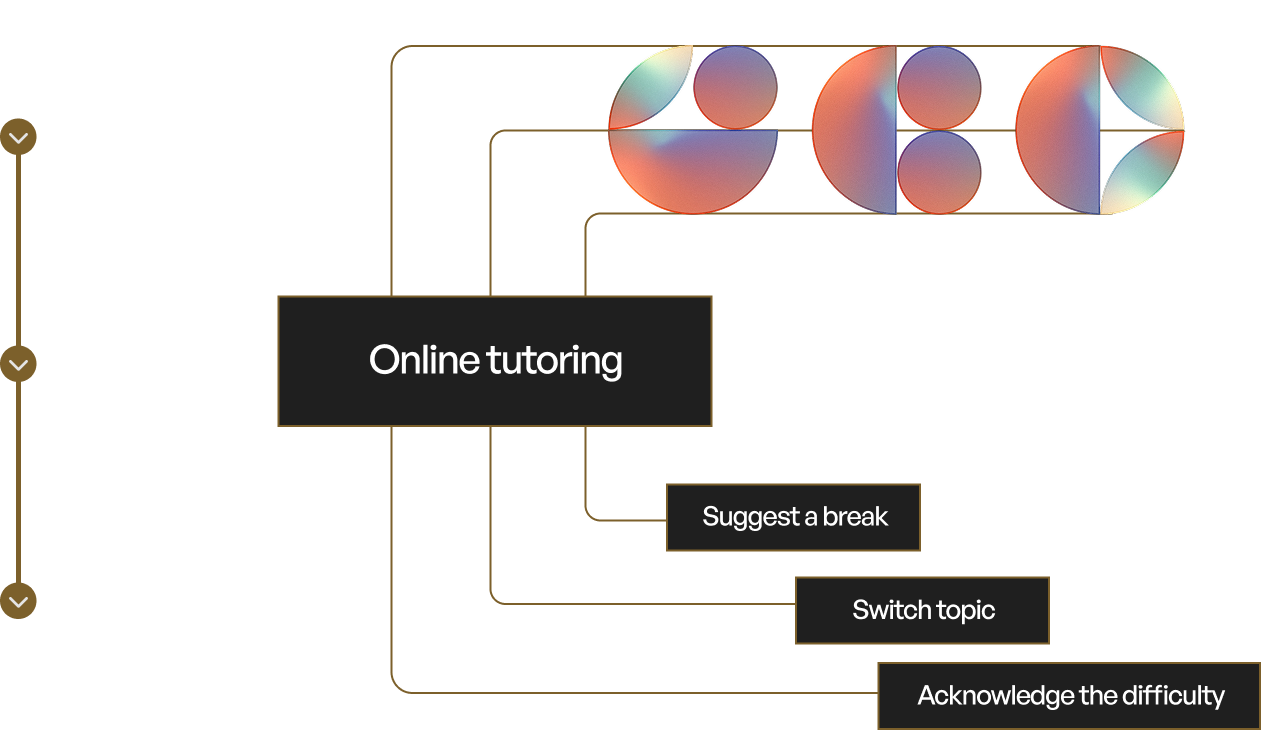 Consider a policy configured for an online tutoring platform.
Sentinel streams audio from a live tutoring session. Biomarker models
detect that the student's stress is rising, fatigue is elevated, and
vocal tone is shifting toward frustration — while the transcript shows
the student has stopped answering questions and is giving short,
disengaged responses.
Individually, none of these signals are conclusive. Elevated stress
could be productive effort. Short responses could be focus, not
disengagement. The policy combines them: when stress, fatigue, and
linguistic disengagement cross a configured threshold within the same
conversational window, the policy triggers. Sentinel returns a single,
domain-appropriate result — the student is struggling — with a
recommended action: acknowledge the difficulty and suggest a break or
topic switch.
The tutoring agent adjusts its approach in real time. No human needed
to intervene.
This same pattern applies across any domain — healthcare, contact
centres, coaching, safety monitoring — with different biomarker
combinations, thresholds, and recommended actions tailored to each
context.
## Multiple policies
Multiple policies can run simultaneously on the same conversation. Each
triggers independently, so a single session could monitor wellbeing,
extract structured data from the conversation, and track engagement —
all at once, each producing its own results.
## Custom policies
Policies are fully configurable. thymia works with you to define the
biomarker combinations, thresholds, and domain logic that match your
use case — whether that's agent evaluation, interview anxiety detection,
therapy session quality, or something entirely new.
Contact [support@thymia.ai](mailto:support@thymia.ai) to discuss
your requirements.
## Next steps
* [Sentinel Docs](https://thymia-ai.github.io/thymia-sentinel-integrations/1.1.0/) — SDK reference, integrations, and more.
Consider a policy configured for an online tutoring platform.
Sentinel streams audio from a live tutoring session. Biomarker models
detect that the student's stress is rising, fatigue is elevated, and
vocal tone is shifting toward frustration — while the transcript shows
the student has stopped answering questions and is giving short,
disengaged responses.
Individually, none of these signals are conclusive. Elevated stress
could be productive effort. Short responses could be focus, not
disengagement. The policy combines them: when stress, fatigue, and
linguistic disengagement cross a configured threshold within the same
conversational window, the policy triggers. Sentinel returns a single,
domain-appropriate result — the student is struggling — with a
recommended action: acknowledge the difficulty and suggest a break or
topic switch.
The tutoring agent adjusts its approach in real time. No human needed
to intervene.
This same pattern applies across any domain — healthcare, contact
centres, coaching, safety monitoring — with different biomarker
combinations, thresholds, and recommended actions tailored to each
context.
## Multiple policies
Multiple policies can run simultaneously on the same conversation. Each
triggers independently, so a single session could monitor wellbeing,
extract structured data from the conversation, and track engagement —
all at once, each producing its own results.
## Custom policies
Policies are fully configurable. thymia works with you to define the
biomarker combinations, thresholds, and domain logic that match your
use case — whether that's agent evaluation, interview anxiety detection,
therapy session quality, or something entirely new.
Contact [support@thymia.ai](mailto:support@thymia.ai) to discuss
your requirements.
## Next steps
* [Sentinel Docs](https://thymia-ai.github.io/thymia-sentinel-integrations/1.1.0/) — SDK reference, integrations, and more.
***
# Introduction
## Base URL
```bash
https://api.thymia.ai
```
| Region | Base URL |
| ------------- | -------------------------- |
| Default | `https://api.thymia.ai` |
| Canada | `https://ca.api.thymia.ai` |
| United States | `https://us.api.thymia.ai` |
## Authentication
All requests must include your API key in the `x-api-key` header:
```bash
x-api-key: YOUR_API_KEY
```
**Your API key is a secret.** Do not share it or expose it in
client-side code. Contact
[support@thymia.ai](mailto:support@thymia.ai) immediately if your
key is compromised.
### Making your first request
## Request and response format
All request and response bodies use JSON. Timestamps use ISO 8601
format unless stated otherwise:
```bash
YYYY-MM-DDTHH:MM:SS+HH:MM
```
## HTTP status codes
| Status code | Meaning |
| ----------- | ------------------------------------------------------- |
| `200` | Request succeeded |
| `401` | Unauthorized — missing or invalid API key |
| `404` | Not found — resource does not exist or has been deleted |
| `422` | Unprocessable entity — request body is malformed |
## SDKs
Official SDKs are coming soon. The thymia API can be called from
any language or framework that supports HTTP requests.
## Endpoints
Create model runs, upload recordings, retrieve biomarker results.
Create model runs, upload recordings, retrieve disorder and
symptom scores.
Real-time voice safety and wellbeing monitoring SDK.
Create questionnaires, retrieve responses and scores.
Upload JSON data gathered about a specific user.
Retrieve account details and enabled features.
***
# Run the model on an existing recording
POST /v1/models/mental-wellness
Content-Type: application/json
Create a new run of the Mental Wellness model for a specific user, with an existing file as input. Model runs require a
recording of the user speaking, as well as some metadata about the user and the recording.
The response contains:
* An upload url which the contents of an existing recording can be uploaded to via a `PUT` call.
* The id of the new model run which can be used to poll for results **after the recording has been uploaded**.
Reference: https://docs.thymia.ai/api-reference/thymia-api/mental-wellness-thymia-helios/create-model-run-with-upload-v-1-models-mental-wellness-post
## OpenAPI Specification
```yaml
openapi: 3.1.0
info:
title: Thymia API
version: 1.0.0
paths:
/v1/models/mental-wellness:
post:
operationId: create-model-run-with-upload-v-1-models-mental-wellness-post
summary: Run the model on an existing recording
description: >-
Create a new run of the Mental Wellness model for a specific user, with
an existing file as input. Model runs require a
recording of the user speaking, as well as some metadata about the user
and the recording.
The response contains:
* An upload url which the contents of an existing recording can be uploaded to via a `PUT` call.
* The id of the new model run which can be used to poll for results **after the recording has been uploaded**.
tags:
- subpackage_mentalWellnessThymiaHelios
parameters:
- name: x-api-key
in: header
description: Your API Activation Key
required: true
schema:
type: string
responses:
'200':
description: >-
Details of new model run created, including an upload link for the
recording to input to the Mental Wellness model
content:
application/json:
schema:
$ref: >-
#/components/schemas/MentalWellnessModelRunCreateUploadResponse
'422':
description: Validation Error
content:
application/json:
schema:
$ref: '#/components/schemas/HTTPValidationError'
requestBody:
content:
application/json:
schema:
$ref: '#/components/schemas/MentalWellnessModelRunUploadCreate'
components:
schemas:
BirthSex:
type: string
enum:
- MALE
- FEMALE
- INTERSEX
- UNKNOWN
description: An enumeration.
title: BirthSex
UserDetails:
type: object
properties:
userLabel:
type: string
description: A unique label identifying a user that all model input refers to
dateOfBirth:
type: string
format: date
description: >-
An ISO 8601 date; if day or month are unknown, supply the parts
which *are* known and use `01` for the rest
birthSex:
$ref: '#/components/schemas/BirthSex'
description: The sex assigned to a user at birth
required:
- userLabel
- dateOfBirth
- birthSex
title: UserDetails
LanguageCode:
type: string
enum:
- en
- en-AU
- en-GB
- en-IE
- en-IN
- en-US
- en-ZA
- es-ES
- es-US
- id-ID
- ja-JP
description: An enumeration.
title: LanguageCode
Accent:
type: string
enum:
- ID
- NG
- KE
description: An enumeration.
title: Accent
Tag:
type: object
properties:
name:
type: string
value:
type: string
required:
- name
- value
title: Tag
DataDeletionType:
type: string
enum:
- RECORDINGS
description: An enumeration.
title: DataDeletionType
MentalWellnessModelRunUploadCreate:
type: object
properties:
user:
$ref: '#/components/schemas/UserDetails'
description: The user that this model run is being submitted for
language:
$ref: '#/components/schemas/LanguageCode'
description: >-
The code of the language being spoken by the user in the recording
to be uploaded
accent:
$ref: '#/components/schemas/Accent'
description: >-
The accent of the user speaking, in addition to the language they
are speaking
sleepTime:
type: string
format: date-time
description: >-
When the user fell asleep for their last main sleep before the
recording was made (as an ISO 8601 datetime). This should not
include timezone information but it is assumed to be in the
local timezone of the user in the recording so the time of day can
be inferred.
wakeTime:
type: string
format: date-time
description: >-
When the user woke from their last main sleep before the recording
was made (as an ISO 8601 datetime). This should not include
timezone information but it is assumed to be in the local
timezone of the user in the recording so the time of day can be
inferred.
tags:
type: array
items:
$ref: '#/components/schemas/Tag'
description: |-
Name/Value pairs to tag a model run for later identification. Note:
* Tag names must be unique
* At most 20 tags are allowed per model run
deleteData:
type: boolean
default: false
description: >-
Boolean flag indicating if user data is to be deleted after the
completion of the model run. If True, the recordings, model inputs
and model results will be deleted 12 hrs after the model run
completes. Attempts to retrieve results after this time will receive
a 404 error. If you wish to be more specific about which types of
data are deleted, see the `data_to_delete` field below.
dataToDelete:
type: array
items:
$ref: '#/components/schemas/DataDeletionType'
description: >-
An array of data types to indicate which data inputs should be
deleted after completion of the model run.
To be used in combination with the `delete_data` boolean flag. Note:
* If `delete_data` is set to `true` and `data_to_delete` value is
omitted, all data will be deleted.
* If `delete_data` is set to `true` and `data_to_delete` value is
set to one or more data types, only the specified data will be
deleted.
recordingTime:
type: string
format: date-time
description: >-
When the recording was made (as an ISO 8601 datetime). This should
not include timezone information but it is assumed to be in
the local timezone of the user in the recording so the time of day
can be inferred.
required:
- user
- language
title: MentalWellnessModelRunUploadCreate
MentalWellnessModelRunCreateUploadResponse:
type: object
properties:
id:
type: string
format: uuid
description: The id of the newly created model run
recordingUploadUrl:
type: string
description: >-
The url to upload recording contents to via a `PUT` request. Note:
* Recordings should contain at least 10 seconds of speech and be
under 3 minutes long
* Supported formats are FLAC, MP3, MP4, Ogg, WebM, WAV
* The upload url is valid for 1 hour
required:
- id
- recordingUploadUrl
title: MentalWellnessModelRunCreateUploadResponse
ValidationErrorLocItems:
oneOf:
- type: string
- type: integer
title: ValidationErrorLocItems
ValidationError:
type: object
properties:
loc:
type: array
items:
$ref: '#/components/schemas/ValidationErrorLocItems'
msg:
type: string
type:
type: string
required:
- loc
- msg
- type
title: ValidationError
HTTPValidationError:
type: object
properties:
detail:
type: array
items:
$ref: '#/components/schemas/ValidationError'
title: HTTPValidationError
securitySchemes:
APIKeyHeader:
type: apiKey
in: header
name: x-api-key
description: Your API Activation Key
```
## SDK Code Examples
```python
import requests
url = "https://api.example.com/v1/models/mental-wellness"
payload = {
"user": {
"userLabel": "42baba59-fa4a-4a22-ba1c-2e4a88a3badb",
"dateOfBirth": "1990-08-24",
"birthSex": "MALE"
},
"language": "en-GB"
}
headers = {
"x-api-key": "",
"Content-Type": "application/json"
}
response = requests.post(url, json=payload, headers=headers)
print(response.json())
```
```javascript
const url = 'https://api.example.com/v1/models/mental-wellness';
const options = {
method: 'POST',
headers: {'x-api-key': '', 'Content-Type': 'application/json'},
body: '{"user":{"userLabel":"42baba59-fa4a-4a22-ba1c-2e4a88a3badb","dateOfBirth":"1990-08-24","birthSex":"MALE"},"language":"en-GB"}'
};
try {
const response = await fetch(url, options);
const data = await response.json();
console.log(data);
} catch (error) {
console.error(error);
}
```
```go
package main
import (
"fmt"
"strings"
"net/http"
"io"
)
func main() {
url := "https://api.example.com/v1/models/mental-wellness"
payload := strings.NewReader("{\n \"user\": {\n \"userLabel\": \"42baba59-fa4a-4a22-ba1c-2e4a88a3badb\",\n \"dateOfBirth\": \"1990-08-24\",\n \"birthSex\": \"MALE\"\n },\n \"language\": \"en-GB\"\n}")
req, _ := http.NewRequest("POST", url, payload)
req.Header.Add("x-api-key", "")
req.Header.Add("Content-Type", "application/json")
res, _ := http.DefaultClient.Do(req)
defer res.Body.Close()
body, _ := io.ReadAll(res.Body)
fmt.Println(res)
fmt.Println(string(body))
}
```
```ruby
require 'uri'
require 'net/http'
url = URI("https://api.example.com/v1/models/mental-wellness")
http = Net::HTTP.new(url.host, url.port)
http.use_ssl = true
request = Net::HTTP::Post.new(url)
request["x-api-key"] = ''
request["Content-Type"] = 'application/json'
request.body = "{\n \"user\": {\n \"userLabel\": \"42baba59-fa4a-4a22-ba1c-2e4a88a3badb\",\n \"dateOfBirth\": \"1990-08-24\",\n \"birthSex\": \"MALE\"\n },\n \"language\": \"en-GB\"\n}"
response = http.request(request)
puts response.read_body
```
```java
import com.mashape.unirest.http.HttpResponse;
import com.mashape.unirest.http.Unirest;
HttpResponse response = Unirest.post("https://api.example.com/v1/models/mental-wellness")
.header("x-api-key", "")
.header("Content-Type", "application/json")
.body("{\n \"user\": {\n \"userLabel\": \"42baba59-fa4a-4a22-ba1c-2e4a88a3badb\",\n \"dateOfBirth\": \"1990-08-24\",\n \"birthSex\": \"MALE\"\n },\n \"language\": \"en-GB\"\n}")
.asString();
```
```php
request('POST', 'https://api.example.com/v1/models/mental-wellness', [
'body' => '{
"user": {
"userLabel": "42baba59-fa4a-4a22-ba1c-2e4a88a3badb",
"dateOfBirth": "1990-08-24",
"birthSex": "MALE"
},
"language": "en-GB"
}',
'headers' => [
'Content-Type' => 'application/json',
'x-api-key' => '',
],
]);
echo $response->getBody();
```
```csharp
using RestSharp;
var client = new RestClient("https://api.example.com/v1/models/mental-wellness");
var request = new RestRequest(Method.POST);
request.AddHeader("x-api-key", "");
request.AddHeader("Content-Type", "application/json");
request.AddParameter("application/json", "{\n \"user\": {\n \"userLabel\": \"42baba59-fa4a-4a22-ba1c-2e4a88a3badb\",\n \"dateOfBirth\": \"1990-08-24\",\n \"birthSex\": \"MALE\"\n },\n \"language\": \"en-GB\"\n}", ParameterType.RequestBody);
IRestResponse response = client.Execute(request);
```
```swift
import Foundation
let headers = [
"x-api-key": "",
"Content-Type": "application/json"
]
let parameters = [
"user": [
"userLabel": "42baba59-fa4a-4a22-ba1c-2e4a88a3badb",
"dateOfBirth": "1990-08-24",
"birthSex": "MALE"
],
"language": "en-GB"
] as [String : Any]
let postData = JSONSerialization.data(withJSONObject: parameters, options: [])
let request = NSMutableURLRequest(url: NSURL(string: "https://api.example.com/v1/models/mental-wellness")! as URL,
cachePolicy: .useProtocolCachePolicy,
timeoutInterval: 10.0)
request.httpMethod = "POST"
request.allHTTPHeaderFields = headers
request.httpBody = postData as Data
let session = URLSession.shared
let dataTask = session.dataTask(with: request as URLRequest, completionHandler: { (data, response, error) -> Void in
if (error != nil) {
print(error as Any)
} else {
let httpResponse = response as? HTTPURLResponse
print(httpResponse)
}
})
dataTask.resume()
```
# Get model run status & results
GET /v1/models/mental-wellness/{model_run_id}
Retrieve the details of an existing Mental Wellness model run, including results if they are available.
Reference: https://docs.thymia.ai/api-reference/thymia-api/mental-wellness-thymia-helios/get-model-run-v-1-models-mental-wellness-model-run-id-get
## OpenAPI Specification
```yaml
openapi: 3.1.0
info:
title: Thymia API
version: 1.0.0
paths:
/v1/models/mental-wellness/{model_run_id}:
get:
operationId: get-model-run-v-1-models-mental-wellness-model-run-id-get
summary: Get model run status & results
description: >-
Retrieve the details of an existing Mental Wellness model run, including
results if they are available.
tags:
- subpackage_mentalWellnessThymiaHelios
parameters:
- name: model_run_id
in: path
required: true
schema:
type: string
format: uuid
- name: x-api-key
in: header
description: Your API Activation Key
required: true
schema:
type: string
responses:
'200':
description: Details of model run's current state
content:
application/json:
schema:
$ref: '#/components/schemas/MentalWellnessModelRunResponse'
'404':
description: Model run not found
content:
application/json:
schema:
description: Any type
'422':
description: Validation Error
content:
application/json:
schema:
$ref: '#/components/schemas/HTTPValidationError'
components:
schemas:
ModelRunStatus:
type: string
enum:
- CREATED
- RUNNING
- COMPLETE_OK
- COMPLETE_ERROR
description: An enumeration.
title: ModelRunStatus
MentalWellnessValue:
type: object
properties:
value:
type: number
format: double
required:
- value
title: MentalWellnessValue
MentalWellnessContinuousValue:
type: object
properties:
value:
type: number
format: double
required:
- value
title: MentalWellnessContinuousValue
MentalWellnessPartResult:
type: object
properties:
startSecs:
type: number
format: double
description: >-
Time in seconds (since the start of the whole recording) that this
section starts at
finishSecs:
type: number
format: double
description: >-
Time in seconds (since the start of the whole recording) that this
section finishes at
transcript:
type: string
description: The transcription of speech within this section of the recording
distress:
$ref: '#/components/schemas/MentalWellnessValue'
description: >-
A measure of the user’s levels of distress, or in other words worry,
nervousness or a feeling of being on edge.
stress:
$ref: '#/components/schemas/MentalWellnessValue'
description: >-
A measure of the user’s stress levels, or in other words how anxious
or wound up they may feel on this day, whether they are able to
relax.
exhaustion:
$ref: '#/components/schemas/MentalWellnessValue'
description: >-
A measure of the user’s physical and mental tiredness as a result of
manual or cognitive labour on this or previous days. This is not
directly linked to a lack of sleep or the time of day.
sleepPropensity:
$ref: '#/components/schemas/MentalWellnessValue'
description: >-
A measure of the user’s sleepiness, i.e. a measure of how likely
they are to fall asleep if given the opportunity. This is more
directly related to poor sleep or a lack of sleep over a single
night or several nights.
lowSelfEsteem:
$ref: '#/components/schemas/MentalWellnessValue'
description: >-
A measure of how well or confident the user feels in themselves and
how they feel they measure up to the expectations of themselves and
of others.
mentalStrain:
$ref: '#/components/schemas/MentalWellnessValue'
description: An overall measure of the user’s mental wellness.
uniformDistress:
$ref: '#/components/schemas/MentalWellnessContinuousValue'
description: >-
A continuous measure of the user’s levels of distress, or in other
words worry, nervousness or a feeling of being on edge.
uniformStress:
$ref: '#/components/schemas/MentalWellnessContinuousValue'
description: >-
A continuous measure of the user’s stress levels, or in other words
how anxious or wound up they may feel on this day, whether they are
able to relax.
uniformExhaustion:
$ref: '#/components/schemas/MentalWellnessContinuousValue'
description: >-
A continuous measure of the user’s physical and mental tiredness as
a result of manual or cognitive labour on this or previous days.
This is not directly linked to a lack of sleep or the time of day.
uniformSleepPropensity:
$ref: '#/components/schemas/MentalWellnessContinuousValue'
description: >-
A continuous measure of the user’s sleepiness, i.e. a measure of how
likely they are to fall asleep if given the opportunity. This is
more directly related to poor sleep or a lack of sleep over a single
night or several nights.
uniformLowSelfEsteem:
$ref: '#/components/schemas/MentalWellnessContinuousValue'
description: >-
A continuous measure of how well or confident the user feels in
themselves and how they feel they measure up to the expectations of
themselves and of others.
required:
- startSecs
- finishSecs
- transcript
- distress
- stress
- exhaustion
- sleepPropensity
- lowSelfEsteem
- mentalStrain
title: MentalWellnessPartResult
MentalWellnessResults:
type: object
properties:
sections:
type: array
items:
$ref: '#/components/schemas/MentalWellnessPartResult'
description: >-
An array of mental wellness indicators, each specific to one timed
section of the recording
required:
- sections
title: MentalWellnessResults
MentalWellnessErrorCode:
type: string
enum:
- ERR_RECORDING_INVALID_FORMAT
- ERR_RECORDING_TOO_SHORT
- ERR_RECORDING_TOO_LONG
- ERR_TRANSCRIPTION_FAILED
- ERR_INTERNAL
description: An enumeration.
title: MentalWellnessErrorCode
Tag:
type: object
properties:
name:
type: string
value:
type: string
required:
- name
- value
title: Tag
DataDeletionType:
type: string
enum:
- RECORDINGS
description: An enumeration.
title: DataDeletionType
MentalWellnessModelRunResponse:
type: object
properties:
id:
type: string
format: uuid
description: The id of the existing model run
createdAt:
type: string
format: date-time
description: When the model run was submitted to the API
status:
$ref: '#/components/schemas/ModelRunStatus'
description: |-
Current status of the model run. Possible values:
* `CREATED`: Model run created; Waiting for files to be uploaded or thymia activities to be completed
* `RUNNING`: All input to model has been supplied and the model is being executed
* `COMPLETE_OK`: Model execution completed ok and results are available
* `COMPLETE_ERROR`: Model execution completed with error and no results available
runAt:
type: string
format: date-time
description: >-
The time the model run started executing and the status changed to
`RUNNING`. This is after all input to the model has been supplied
completedAt:
type: string
format: date-time
description: >-
When the model run finished processing and either results or an
error reason are available; only populated once the model run
completes
errorReason:
type: string
description: Only populated if the model run ended with `COMPLETE_ERROR` status
warnings:
type: array
items:
type: string
description: >-
Contain warnings about potential issues that occurred during the
model run.
userLabel:
type: string
description: Label of the user that this model run was submitted for
results:
$ref: '#/components/schemas/MentalWellnessResults'
description: Only populated if the model run ended with `COMPLETE_OK` status
errorCode:
$ref: '#/components/schemas/MentalWellnessErrorCode'
description: >-
Only populated if the model run ended with `COMPLETE_ERROR` status.
Meaning of each error code:
* `ERR_RECORDING_INVALID_FORMAT` - The recording supplied was not in
supported file format.
* `ERR_RECORDING_TOO_SHORT` - The recording supplied contained less
than the minimum required amount of 10 seconds of speech.
* `ERR_RECORDING_TOO_LONG` - The recording supplied exceeded the
maximum allowed length of 3 minutes.
* `ERR_TRANSCRIPTION_FAILED` - Couldn't determine speech in the
recording supplied.
* `ERR_INTERNAL` - An internal error occurred.
activityType:
type: string
description: |-
The activity type requested when creating the model run.
Only populated if using the Thymia Activity Plugin and specifying an activity type (instead of using the default type).
tags:
type: array
items:
$ref: '#/components/schemas/Tag'
description: Name/Value pairs the model run was tagged with when created.
deleteData:
type: boolean
description: >-
Boolean flag indicating if user data is to be deleted after the
completion of the model run.
dataToDelete:
type: array
items:
$ref: '#/components/schemas/DataDeletionType'
description: >-
An array of data types to indicate which data inputs should be
deleted after the completion of the model run.
model:
type: string
description: The version of model used in the model run.
required:
- id
- createdAt
- status
- userLabel
- deleteData
title: MentalWellnessModelRunResponse
ValidationErrorLocItems:
oneOf:
- type: string
- type: integer
title: ValidationErrorLocItems
ValidationError:
type: object
properties:
loc:
type: array
items:
$ref: '#/components/schemas/ValidationErrorLocItems'
msg:
type: string
type:
type: string
required:
- loc
- msg
- type
title: ValidationError
HTTPValidationError:
type: object
properties:
detail:
type: array
items:
$ref: '#/components/schemas/ValidationError'
title: HTTPValidationError
securitySchemes:
APIKeyHeader:
type: apiKey
in: header
name: x-api-key
description: Your API Activation Key
```
## SDK Code Examples
```python
import requests
url = "https://api.example.com/v1/models/mental-wellness/model_run_id"
payload = {}
headers = {
"x-api-key": "",
"Content-Type": "application/json"
}
response = requests.get(url, json=payload, headers=headers)
print(response.json())
```
```javascript
const url = 'https://api.example.com/v1/models/mental-wellness/model_run_id';
const options = {
method: 'GET',
headers: {'x-api-key': '', 'Content-Type': 'application/json'},
body: '{}'
};
try {
const response = await fetch(url, options);
const data = await response.json();
console.log(data);
} catch (error) {
console.error(error);
}
```
```go
package main
import (
"fmt"
"strings"
"net/http"
"io"
)
func main() {
url := "https://api.example.com/v1/models/mental-wellness/model_run_id"
payload := strings.NewReader("{}")
req, _ := http.NewRequest("GET", url, payload)
req.Header.Add("x-api-key", "")
req.Header.Add("Content-Type", "application/json")
res, _ := http.DefaultClient.Do(req)
defer res.Body.Close()
body, _ := io.ReadAll(res.Body)
fmt.Println(res)
fmt.Println(string(body))
}
```
```ruby
require 'uri'
require 'net/http'
url = URI("https://api.example.com/v1/models/mental-wellness/model_run_id")
http = Net::HTTP.new(url.host, url.port)
http.use_ssl = true
request = Net::HTTP::Get.new(url)
request["x-api-key"] = ''
request["Content-Type"] = 'application/json'
request.body = "{}"
response = http.request(request)
puts response.read_body
```
```java
import com.mashape.unirest.http.HttpResponse;
import com.mashape.unirest.http.Unirest;
HttpResponse response = Unirest.get("https://api.example.com/v1/models/mental-wellness/model_run_id")
.header("x-api-key", "")
.header("Content-Type", "application/json")
.body("{}")
.asString();
```
```php
request('GET', 'https://api.example.com/v1/models/mental-wellness/model_run_id', [
'body' => '{}',
'headers' => [
'Content-Type' => 'application/json',
'x-api-key' => '',
],
]);
echo $response->getBody();
```
```csharp
using RestSharp;
var client = new RestClient("https://api.example.com/v1/models/mental-wellness/model_run_id");
var request = new RestRequest(Method.GET);
request.AddHeader("x-api-key", "");
request.AddHeader("Content-Type", "application/json");
request.AddParameter("application/json", "{}", ParameterType.RequestBody);
IRestResponse response = client.Execute(request);
```
```swift
import Foundation
let headers = [
"x-api-key": "",
"Content-Type": "application/json"
]
let parameters = [] as [String : Any]
let postData = JSONSerialization.data(withJSONObject: parameters, options: [])
let request = NSMutableURLRequest(url: NSURL(string: "https://api.example.com/v1/models/mental-wellness/model_run_id")! as URL,
cachePolicy: .useProtocolCachePolicy,
timeoutInterval: 10.0)
request.httpMethod = "GET"
request.allHTTPHeaderFields = headers
request.httpBody = postData as Data
let session = URLSession.shared
let dataTask = session.dataTask(with: request as URLRequest, completionHandler: { (data, response, error) -> Void in
if (error != nil) {
print(error as Any)
} else {
let httpResponse = response as? HTTPURLResponse
print(httpResponse)
}
})
dataTask.resume()
```
# Run the model using the Thymia Activity Plugin
POST /v1/models/mental-wellness-activity
Content-Type: application/json
Create a new run of the Mental Wellness model for a specific user, using the Thymia Activity Plugin to host an activity and capture a recording.
The response contains:
* A link for the user to perform an activity. The link should then be embedded in the Thymia Activity Plugin.
Once the activity is completed, the recording of it will be used automatically as input to the model.
* The id of the new model run which can be used to poll for results **after the activity has been completed**.
Reference: https://docs.thymia.ai/api-reference/thymia-api/mental-wellness-thymia-helios/create-model-run-with-activity-v-1-models-mental-wellness-activity-post
## OpenAPI Specification
```yaml
openapi: 3.1.0
info:
title: Thymia API
version: 1.0.0
paths:
/v1/models/mental-wellness-activity:
post:
operationId: create-model-run-with-activity-v-1-models-mental-wellness-activity-post
summary: Run the model using the Thymia Activity Plugin
description: >-
Create a new run of the Mental Wellness model for a specific user, using
the Thymia Activity Plugin to host an activity and capture a recording.
The response contains:
* A link for the user to perform an activity. The link should then be embedded in the Thymia Activity Plugin.
Once the activity is completed, the recording of it will be used automatically as input to the model.
* The id of the new model run which can be used to poll for results **after the activity has been completed**.
tags:
- subpackage_mentalWellnessThymiaHelios
parameters:
- name: x-api-key
in: header
description: Your API Activation Key
required: true
schema:
type: string
responses:
'200':
description: >-
Details of new model run created, including a link to a thymia
activity.
content:
application/json:
schema:
$ref: >-
#/components/schemas/MentalWellnessModelRunCreateActivityResponse
'422':
description: Validation Error
content:
application/json:
schema:
$ref: '#/components/schemas/HTTPValidationError'
requestBody:
content:
application/json:
schema:
$ref: '#/components/schemas/MentalWellnessModelRunActivityCreate'
components:
schemas:
BirthSex:
type: string
enum:
- MALE
- FEMALE
- INTERSEX
- UNKNOWN
description: An enumeration.
title: BirthSex
UserDetails:
type: object
properties:
userLabel:
type: string
description: A unique label identifying a user that all model input refers to
dateOfBirth:
type: string
format: date
description: >-
An ISO 8601 date; if day or month are unknown, supply the parts
which *are* known and use `01` for the rest
birthSex:
$ref: '#/components/schemas/BirthSex'
description: The sex assigned to a user at birth
required:
- userLabel
- dateOfBirth
- birthSex
title: UserDetails
LanguageCode:
type: string
enum:
- en
- en-AU
- en-GB
- en-IE
- en-IN
- en-US
- en-ZA
- es-ES
- es-US
- id-ID
- ja-JP
description: An enumeration.
title: LanguageCode
Accent:
type: string
enum:
- ID
- NG
- KE
description: An enumeration.
title: Accent
Tag:
type: object
properties:
name:
type: string
value:
type: string
required:
- name
- value
title: Tag
DataDeletionType:
type: string
enum:
- RECORDINGS
description: An enumeration.
title: DataDeletionType
MentalWellnessModelRunActivityCreate:
type: object
properties:
user:
$ref: '#/components/schemas/UserDetails'
description: The user that this model run is being submitted for
language:
$ref: '#/components/schemas/LanguageCode'
description: >-
The code of the language being spoken by the user in the recording
to be uploaded
accent:
$ref: '#/components/schemas/Accent'
description: >-
The accent of the user speaking, in addition to the language they
are speaking
sleepTime:
type: string
format: date-time
description: >-
When the user fell asleep for their last main sleep before the
recording was made (as an ISO 8601 datetime). This should not
include timezone information but it is assumed to be in the
local timezone of the user in the recording so the time of day can
be inferred.
wakeTime:
type: string
format: date-time
description: >-
When the user woke from their last main sleep before the recording
was made (as an ISO 8601 datetime). This should not include
timezone information but it is assumed to be in the local
timezone of the user in the recording so the time of day can be
inferred.
tags:
type: array
items:
$ref: '#/components/schemas/Tag'
description: |-
Name/Value pairs to tag a model run for later identification. Note:
* Tag names must be unique
* At most 20 tags are allowed per model run
deleteData:
type: boolean
default: false
description: >-
Boolean flag indicating if user data is to be deleted after the
completion of the model run. If True, the recordings, model inputs
and model results will be deleted 12 hrs after the model run
completes. Attempts to retrieve results after this time will receive
a 404 error. If you wish to be more specific about which types of
data are deleted, see the `data_to_delete` field below.
dataToDelete:
type: array
items:
$ref: '#/components/schemas/DataDeletionType'
description: >-
An array of data types to indicate which data inputs should be
deleted after completion of the model run.
To be used in combination with the `delete_data` boolean flag. Note:
* If `delete_data` is set to `true` and `data_to_delete` value is
omitted, all data will be deleted.
* If `delete_data` is set to `true` and `data_to_delete` value is
set to one or more data types, only the specified data will be
deleted.
activityType:
type: string
description: >-
The type of activity to show to users. If omitted, a default
activity will be used.
See the [online docs](https://thymia.ai/docs/building-your-integration) for the latest list of activities to choose from.
required:
- user
- language
title: MentalWellnessModelRunActivityCreate
MentalWellnessModelRunCreateActivityResponse:
type: object
properties:
id:
type: string
format: uuid
description: The id of the newly created model run
activityLink:
type: string
description: >-
A link to the thymia app, allowing users to perform an activity
which captures a recording
required:
- id
- activityLink
title: MentalWellnessModelRunCreateActivityResponse
ValidationErrorLocItems:
oneOf:
- type: string
- type: integer
title: ValidationErrorLocItems
ValidationError:
type: object
properties:
loc:
type: array
items:
$ref: '#/components/schemas/ValidationErrorLocItems'
msg:
type: string
type:
type: string
required:
- loc
- msg
- type
title: ValidationError
HTTPValidationError:
type: object
properties:
detail:
type: array
items:
$ref: '#/components/schemas/ValidationError'
title: HTTPValidationError
securitySchemes:
APIKeyHeader:
type: apiKey
in: header
name: x-api-key
description: Your API Activation Key
```
## SDK Code Examples
```python
import requests
url = "https://api.example.com/v1/models/mental-wellness-activity"
payload = {
"user": {
"userLabel": "a1f5c3d9-7b2e-4f8a-9c3d-2e7f1b6a4d8e",
"dateOfBirth": "1985-04-12",
"birthSex": "MALE"
},
"language": "en-GB"
}
headers = {
"x-api-key": "",
"Content-Type": "application/json"
}
response = requests.post(url, json=payload, headers=headers)
print(response.json())
```
```javascript
const url = 'https://api.example.com/v1/models/mental-wellness-activity';
const options = {
method: 'POST',
headers: {'x-api-key': '', 'Content-Type': 'application/json'},
body: '{"user":{"userLabel":"a1f5c3d9-7b2e-4f8a-9c3d-2e7f1b6a4d8e","dateOfBirth":"1985-04-12","birthSex":"MALE"},"language":"en-GB"}'
};
try {
const response = await fetch(url, options);
const data = await response.json();
console.log(data);
} catch (error) {
console.error(error);
}
```
```go
package main
import (
"fmt"
"strings"
"net/http"
"io"
)
func main() {
url := "https://api.example.com/v1/models/mental-wellness-activity"
payload := strings.NewReader("{\n \"user\": {\n \"userLabel\": \"a1f5c3d9-7b2e-4f8a-9c3d-2e7f1b6a4d8e\",\n \"dateOfBirth\": \"1985-04-12\",\n \"birthSex\": \"MALE\"\n },\n \"language\": \"en-GB\"\n}")
req, _ := http.NewRequest("POST", url, payload)
req.Header.Add("x-api-key", "")
req.Header.Add("Content-Type", "application/json")
res, _ := http.DefaultClient.Do(req)
defer res.Body.Close()
body, _ := io.ReadAll(res.Body)
fmt.Println(res)
fmt.Println(string(body))
}
```
```ruby
require 'uri'
require 'net/http'
url = URI("https://api.example.com/v1/models/mental-wellness-activity")
http = Net::HTTP.new(url.host, url.port)
http.use_ssl = true
request = Net::HTTP::Post.new(url)
request["x-api-key"] = ''
request["Content-Type"] = 'application/json'
request.body = "{\n \"user\": {\n \"userLabel\": \"a1f5c3d9-7b2e-4f8a-9c3d-2e7f1b6a4d8e\",\n \"dateOfBirth\": \"1985-04-12\",\n \"birthSex\": \"MALE\"\n },\n \"language\": \"en-GB\"\n}"
response = http.request(request)
puts response.read_body
```
```java
import com.mashape.unirest.http.HttpResponse;
import com.mashape.unirest.http.Unirest;
HttpResponse response = Unirest.post("https://api.example.com/v1/models/mental-wellness-activity")
.header("x-api-key", "")
.header("Content-Type", "application/json")
.body("{\n \"user\": {\n \"userLabel\": \"a1f5c3d9-7b2e-4f8a-9c3d-2e7f1b6a4d8e\",\n \"dateOfBirth\": \"1985-04-12\",\n \"birthSex\": \"MALE\"\n },\n \"language\": \"en-GB\"\n}")
.asString();
```
```php
request('POST', 'https://api.example.com/v1/models/mental-wellness-activity', [
'body' => '{
"user": {
"userLabel": "a1f5c3d9-7b2e-4f8a-9c3d-2e7f1b6a4d8e",
"dateOfBirth": "1985-04-12",
"birthSex": "MALE"
},
"language": "en-GB"
}',
'headers' => [
'Content-Type' => 'application/json',
'x-api-key' => '',
],
]);
echo $response->getBody();
```
```csharp
using RestSharp;
var client = new RestClient("https://api.example.com/v1/models/mental-wellness-activity");
var request = new RestRequest(Method.POST);
request.AddHeader("x-api-key", "");
request.AddHeader("Content-Type", "application/json");
request.AddParameter("application/json", "{\n \"user\": {\n \"userLabel\": \"a1f5c3d9-7b2e-4f8a-9c3d-2e7f1b6a4d8e\",\n \"dateOfBirth\": \"1985-04-12\",\n \"birthSex\": \"MALE\"\n },\n \"language\": \"en-GB\"\n}", ParameterType.RequestBody);
IRestResponse response = client.Execute(request);
```
```swift
import Foundation
let headers = [
"x-api-key": "",
"Content-Type": "application/json"
]
let parameters = [
"user": [
"userLabel": "a1f5c3d9-7b2e-4f8a-9c3d-2e7f1b6a4d8e",
"dateOfBirth": "1985-04-12",
"birthSex": "MALE"
],
"language": "en-GB"
] as [String : Any]
let postData = JSONSerialization.data(withJSONObject: parameters, options: [])
let request = NSMutableURLRequest(url: NSURL(string: "https://api.example.com/v1/models/mental-wellness-activity")! as URL,
cachePolicy: .useProtocolCachePolicy,
timeoutInterval: 10.0)
request.httpMethod = "POST"
request.allHTTPHeaderFields = headers
request.httpBody = postData as Data
let session = URLSession.shared
let dataTask = session.dataTask(with: request as URLRequest, completionHandler: { (data, response, error) -> Void in
if (error != nil) {
print(error as Any)
} else {
let httpResponse = response as? HTTPURLResponse
print(httpResponse)
}
})
dataTask.resume()
```
# Upload User Data
POST /v1/user-data/{upload_type}
Content-Type: application/json
Upload JSON data of a certain type gathered about a specific user.
> **Warning**:
> * To use this feature, please contact thymia to agree an upload format and type.
> * Please do not upload any personally identifiable data.
Reference: https://docs.thymia.ai/api-reference/thymia-api/user-data/upload-user-data-v-1-user-data-upload-type-post
## OpenAPI Specification
```yaml
openapi: 3.1.0
info:
title: Thymia API
version: 1.0.0
paths:
/v1/user-data/{upload_type}:
post:
operationId: upload-user-data-v-1-user-data-upload-type-post
summary: Upload User Data
description: >-
Upload JSON data of a certain type gathered about a specific user.
> **Warning**:
> * To use this feature, please contact thymia to agree an upload format
and type.
> * Please do not upload any personally identifiable data.
tags:
- subpackage_userData
parameters:
- name: upload_type
in: path
required: true
schema:
type: string
- name: x-api-key
in: header
description: Your API Activation Key
required: true
schema:
type: string
responses:
'200':
description: Successful Response
content:
application/json:
schema:
$ref: '#/components/schemas/UserDataUploadResponse'
'422':
description: Validation Error
content:
application/json:
schema:
$ref: '#/components/schemas/HTTPValidationError'
requestBody:
content:
application/json:
schema:
$ref: '#/components/schemas/UserDataUpload'
components:
schemas:
UserDetailsShort:
type: object
properties:
userLabel:
type: string
description: A unique label identifying a user in your systems
required:
- userLabel
title: UserDetailsShort
UserDataUploadData:
type: object
properties: {}
description: User data JSON object as agreed with thymia
title: UserDataUploadData
UserDataUpload:
type: object
properties:
user:
$ref: '#/components/schemas/UserDetailsShort'
data:
$ref: '#/components/schemas/UserDataUploadData'
description: User data JSON object as agreed with thymia
required:
- user
- data
title: UserDataUpload
UserDataUploadResponse:
type: object
properties:
uploadId:
type: string
format: uuid
description: The id assigned to the uploaded user data
required:
- uploadId
title: UserDataUploadResponse
ValidationErrorLocItems:
oneOf:
- type: string
- type: integer
title: ValidationErrorLocItems
ValidationError:
type: object
properties:
loc:
type: array
items:
$ref: '#/components/schemas/ValidationErrorLocItems'
msg:
type: string
type:
type: string
required:
- loc
- msg
- type
title: ValidationError
HTTPValidationError:
type: object
properties:
detail:
type: array
items:
$ref: '#/components/schemas/ValidationError'
title: HTTPValidationError
securitySchemes:
APIKeyHeader:
type: apiKey
in: header
name: x-api-key
description: Your API Activation Key
```
## SDK Code Examples
```python
import requests
url = "https://api.example.com/v1/user-data/upload_type"
payload = { "user": { "userLabel": "user-12345" } }
headers = {
"x-api-key": "",
"Content-Type": "application/json"
}
response = requests.post(url, json=payload, headers=headers)
print(response.json())
```
```javascript
const url = 'https://api.example.com/v1/user-data/upload_type';
const options = {
method: 'POST',
headers: {'x-api-key': '', 'Content-Type': 'application/json'},
body: '{"user":{"userLabel":"user-12345"}}'
};
try {
const response = await fetch(url, options);
const data = await response.json();
console.log(data);
} catch (error) {
console.error(error);
}
```
```go
package main
import (
"fmt"
"strings"
"net/http"
"io"
)
func main() {
url := "https://api.example.com/v1/user-data/upload_type"
payload := strings.NewReader("{\n \"user\": {\n \"userLabel\": \"user-12345\"\n }\n}")
req, _ := http.NewRequest("POST", url, payload)
req.Header.Add("x-api-key", "")
req.Header.Add("Content-Type", "application/json")
res, _ := http.DefaultClient.Do(req)
defer res.Body.Close()
body, _ := io.ReadAll(res.Body)
fmt.Println(res)
fmt.Println(string(body))
}
```
```ruby
require 'uri'
require 'net/http'
url = URI("https://api.example.com/v1/user-data/upload_type")
http = Net::HTTP.new(url.host, url.port)
http.use_ssl = true
request = Net::HTTP::Post.new(url)
request["x-api-key"] = ''
request["Content-Type"] = 'application/json'
request.body = "{\n \"user\": {\n \"userLabel\": \"user-12345\"\n }\n}"
response = http.request(request)
puts response.read_body
```
```java
import com.mashape.unirest.http.HttpResponse;
import com.mashape.unirest.http.Unirest;
HttpResponse response = Unirest.post("https://api.example.com/v1/user-data/upload_type")
.header("x-api-key", "")
.header("Content-Type", "application/json")
.body("{\n \"user\": {\n \"userLabel\": \"user-12345\"\n }\n}")
.asString();
```
```php
request('POST', 'https://api.example.com/v1/user-data/upload_type', [
'body' => '{
"user": {
"userLabel": "user-12345"
}
}',
'headers' => [
'Content-Type' => 'application/json',
'x-api-key' => '',
],
]);
echo $response->getBody();
```
```csharp
using RestSharp;
var client = new RestClient("https://api.example.com/v1/user-data/upload_type");
var request = new RestRequest(Method.POST);
request.AddHeader("x-api-key", "");
request.AddHeader("Content-Type", "application/json");
request.AddParameter("application/json", "{\n \"user\": {\n \"userLabel\": \"user-12345\"\n }\n}", ParameterType.RequestBody);
IRestResponse response = client.Execute(request);
```
```swift
import Foundation
let headers = [
"x-api-key": "",
"Content-Type": "application/json"
]
let parameters = ["user": ["userLabel": "user-12345"]] as [String : Any]
let postData = JSONSerialization.data(withJSONObject: parameters, options: [])
let request = NSMutableURLRequest(url: NSURL(string: "https://api.example.com/v1/user-data/upload_type")! as URL,
cachePolicy: .useProtocolCachePolicy,
timeoutInterval: 10.0)
request.httpMethod = "POST"
request.allHTTPHeaderFields = headers
request.httpBody = postData as Data
let session = URLSession.shared
let dataTask = session.dataTask(with: request as URLRequest, completionHandler: { (data, response, error) -> Void in
if (error != nil) {
print(error as Any)
} else {
let httpResponse = response as? HTTPURLResponse
print(httpResponse)
}
})
dataTask.resume()
```
# Create a new questionnaire for a user to answer
POST /v1/questionnaires
Content-Type: application/json
Create a questionnaire for a user to answer using a thymia activity.
> **Warning**: Before using this endpoint, please contact thymia to configure the questionnaires you want your users to complete.
The response contains:
* A link to a thymia activity that allows the user to complete the questionnaire.
* The id of the questionnaire which can be used to retrieve results **after the questionnaire has been completed**.
Reference: https://docs.thymia.ai/api-reference/thymia-api/questionnaires/create-questionnaire-v-1-questionnaires-post
## OpenAPI Specification
```yaml
openapi: 3.1.0
info:
title: Thymia API
version: 1.0.0
paths:
/v1/questionnaires:
post:
operationId: create-questionnaire-v-1-questionnaires-post
summary: Create a new questionnaire for a user to answer
description: >-
Create a questionnaire for a user to answer using a thymia activity.
> **Warning**: Before using this endpoint, please contact thymia to
configure the questionnaires you want your users to complete.
The response contains:
* A link to a thymia activity that allows the user to complete the questionnaire.
* The id of the questionnaire which can be used to retrieve results **after the questionnaire has been completed**.
tags:
- subpackage_questionnaires
parameters:
- name: x-api-key
in: header
description: Your API Activation Key
required: true
schema:
type: string
responses:
'200':
description: >-
Details of questionnaire created, including a link to a thymia
activity.
content:
application/json:
schema:
$ref: '#/components/schemas/QuestionnaireCreateResponse'
'422':
description: Validation Error
content:
application/json:
schema:
$ref: '#/components/schemas/HTTPValidationError'
requestBody:
content:
application/json:
schema:
$ref: '#/components/schemas/QuestionnaireCreate'
components:
schemas:
UserDetailsShort:
type: object
properties:
userLabel:
type: string
description: A unique label identifying a user in your systems
required:
- userLabel
title: UserDetailsShort
QuestionnaireCreate:
type: object
properties:
user:
$ref: '#/components/schemas/UserDetailsShort'
questionnaireType:
type: string
description: >-
The type of questionnaire to create, using values agreed with
thymia.
_Before calling, first contact thymia to configure your custom set of questionnaires._
required:
- user
- questionnaireType
title: QuestionnaireCreate
QuestionnaireCreateResponse:
type: object
properties:
id:
type: string
format: uuid
description: The id of the newly created questionnaire
activityLink:
type: string
description: >-
A link to the thymia app, allowing users to answer the questionnaire
as a thymia activity
required:
- id
- activityLink
title: QuestionnaireCreateResponse
ValidationErrorLocItems:
oneOf:
- type: string
- type: integer
title: ValidationErrorLocItems
ValidationError:
type: object
properties:
loc:
type: array
items:
$ref: '#/components/schemas/ValidationErrorLocItems'
msg:
type: string
type:
type: string
required:
- loc
- msg
- type
title: ValidationError
HTTPValidationError:
type: object
properties:
detail:
type: array
items:
$ref: '#/components/schemas/ValidationError'
title: HTTPValidationError
securitySchemes:
APIKeyHeader:
type: apiKey
in: header
name: x-api-key
description: Your API Activation Key
```
## SDK Code Examples
```python
import requests
url = "https://api.example.com/v1/questionnaires"
payload = {
"user": { "userLabel": "user-12345" },
"questionnaireType": "depression-assessment"
}
headers = {
"x-api-key": "",
"Content-Type": "application/json"
}
response = requests.post(url, json=payload, headers=headers)
print(response.json())
```
```javascript
const url = 'https://api.example.com/v1/questionnaires';
const options = {
method: 'POST',
headers: {'x-api-key': '', 'Content-Type': 'application/json'},
body: '{"user":{"userLabel":"user-12345"},"questionnaireType":"depression-assessment"}'
};
try {
const response = await fetch(url, options);
const data = await response.json();
console.log(data);
} catch (error) {
console.error(error);
}
```
```go
package main
import (
"fmt"
"strings"
"net/http"
"io"
)
func main() {
url := "https://api.example.com/v1/questionnaires"
payload := strings.NewReader("{\n \"user\": {\n \"userLabel\": \"user-12345\"\n },\n \"questionnaireType\": \"depression-assessment\"\n}")
req, _ := http.NewRequest("POST", url, payload)
req.Header.Add("x-api-key", "")
req.Header.Add("Content-Type", "application/json")
res, _ := http.DefaultClient.Do(req)
defer res.Body.Close()
body, _ := io.ReadAll(res.Body)
fmt.Println(res)
fmt.Println(string(body))
}
```
```ruby
require 'uri'
require 'net/http'
url = URI("https://api.example.com/v1/questionnaires")
http = Net::HTTP.new(url.host, url.port)
http.use_ssl = true
request = Net::HTTP::Post.new(url)
request["x-api-key"] = ''
request["Content-Type"] = 'application/json'
request.body = "{\n \"user\": {\n \"userLabel\": \"user-12345\"\n },\n \"questionnaireType\": \"depression-assessment\"\n}"
response = http.request(request)
puts response.read_body
```
```java
import com.mashape.unirest.http.HttpResponse;
import com.mashape.unirest.http.Unirest;
HttpResponse response = Unirest.post("https://api.example.com/v1/questionnaires")
.header("x-api-key", "")
.header("Content-Type", "application/json")
.body("{\n \"user\": {\n \"userLabel\": \"user-12345\"\n },\n \"questionnaireType\": \"depression-assessment\"\n}")
.asString();
```
```php
request('POST', 'https://api.example.com/v1/questionnaires', [
'body' => '{
"user": {
"userLabel": "user-12345"
},
"questionnaireType": "depression-assessment"
}',
'headers' => [
'Content-Type' => 'application/json',
'x-api-key' => '',
],
]);
echo $response->getBody();
```
```csharp
using RestSharp;
var client = new RestClient("https://api.example.com/v1/questionnaires");
var request = new RestRequest(Method.POST);
request.AddHeader("x-api-key", "");
request.AddHeader("Content-Type", "application/json");
request.AddParameter("application/json", "{\n \"user\": {\n \"userLabel\": \"user-12345\"\n },\n \"questionnaireType\": \"depression-assessment\"\n}", ParameterType.RequestBody);
IRestResponse response = client.Execute(request);
```
```swift
import Foundation
let headers = [
"x-api-key": "",
"Content-Type": "application/json"
]
let parameters = [
"user": ["userLabel": "user-12345"],
"questionnaireType": "depression-assessment"
] as [String : Any]
let postData = JSONSerialization.data(withJSONObject: parameters, options: [])
let request = NSMutableURLRequest(url: NSURL(string: "https://api.example.com/v1/questionnaires")! as URL,
cachePolicy: .useProtocolCachePolicy,
timeoutInterval: 10.0)
request.httpMethod = "POST"
request.allHTTPHeaderFields = headers
request.httpBody = postData as Data
let session = URLSession.shared
let dataTask = session.dataTask(with: request as URLRequest, completionHandler: { (data, response, error) -> Void in
if (error != nil) {
print(error as Any)
} else {
let httpResponse = response as? HTTPURLResponse
print(httpResponse)
}
})
dataTask.resume()
```
# Get questionnaire status and results
GET /v1/questionnaires/{questionnaire_id}
Retrieves the status of an existing questionnaire, including results if they are available.
Reference: https://docs.thymia.ai/api-reference/thymia-api/questionnaires/get-questionnaire-v-1-questionnaires-questionnaire-id-get
## OpenAPI Specification
```yaml
openapi: 3.1.0
info:
title: Thymia API
version: 1.0.0
paths:
/v1/questionnaires/{questionnaire_id}:
get:
operationId: get-questionnaire-v-1-questionnaires-questionnaire-id-get
summary: Get questionnaire status and results
description: >-
Retrieves the status of an existing questionnaire, including results if
they are available.
tags:
- subpackage_questionnaires
parameters:
- name: questionnaire_id
in: path
required: true
schema:
type: string
format: uuid
- name: x-api-key
in: header
description: Your API Activation Key
required: true
schema:
type: string
responses:
'200':
description: Successful Response
content:
application/json:
schema:
$ref: '#/components/schemas/QuestionnaireResponse'
'422':
description: Validation Error
content:
application/json:
schema:
$ref: '#/components/schemas/HTTPValidationError'
components:
schemas:
QuestionnaireStatus:
type: string
enum:
- RESULTS_NOT_AVAILABLE
- RESULTS_AVAILABLE
description: An enumeration.
title: QuestionnaireStatus
CompletedQuestionnaireDetailsQuestions:
type: object
properties: {}
description: Definition of the questions asked in the questionnaire
title: CompletedQuestionnaireDetailsQuestions
CompletedQuestionnaireDetailsAnswers:
type: object
properties: {}
description: >-
Answers given by user. In case of multiple choice questions, answers
refer to options by id.
title: CompletedQuestionnaireDetailsAnswers
QuestionnaireScoreDetailsScoreMetadata:
type: object
properties: {}
description: Metadata to make sense of the score
title: QuestionnaireScoreDetailsScoreMetadata
QuestionnaireScoreDetails:
type: object
properties:
score:
type: integer
description: Overall score given to this questionnaire response
scoreMetadata:
$ref: '#/components/schemas/QuestionnaireScoreDetailsScoreMetadata'
description: Metadata to make sense of the score
required:
- score
- scoreMetadata
title: QuestionnaireScoreDetails
CompletedQuestionnaireDetails:
type: object
properties:
completedAt:
type: string
format: date-time
description: When the questionnaire was completed
name:
type: string
description: Name of the questionnaire as seen by the user completing it
questions:
$ref: '#/components/schemas/CompletedQuestionnaireDetailsQuestions'
description: Definition of the questions asked in the questionnaire
answers:
$ref: '#/components/schemas/CompletedQuestionnaireDetailsAnswers'
description: >-
Answers given by user. In case of multiple choice questions, answers
refer to options by id.
scoreDetails:
$ref: '#/components/schemas/QuestionnaireScoreDetails'
description: >-
Details of the score given to this questionnaire response. Only
applies to questionnaires that can be scored
required:
- completedAt
- name
- questions
- answers
title: CompletedQuestionnaireDetails
QuestionnaireResponse:
type: object
properties:
status:
$ref: '#/components/schemas/QuestionnaireStatus'
description: >-
Current status of the questionnaire. Possible values:
* `RESULTS_NOT_AVAILABLE`: Questionnaire has not been completed yet
* `RESULTS_AVAILABLE`: Questionnaire has been completed and results
are available
details:
$ref: '#/components/schemas/CompletedQuestionnaireDetails'
description: Only populated if `status` is `RESULTS_AVAILABLE`
required:
- status
title: QuestionnaireResponse
ValidationErrorLocItems:
oneOf:
- type: string
- type: integer
title: ValidationErrorLocItems
ValidationError:
type: object
properties:
loc:
type: array
items:
$ref: '#/components/schemas/ValidationErrorLocItems'
msg:
type: string
type:
type: string
required:
- loc
- msg
- type
title: ValidationError
HTTPValidationError:
type: object
properties:
detail:
type: array
items:
$ref: '#/components/schemas/ValidationError'
title: HTTPValidationError
securitySchemes:
APIKeyHeader:
type: apiKey
in: header
name: x-api-key
description: Your API Activation Key
```
## SDK Code Examples
```python
import requests
url = "https://api.example.com/v1/questionnaires/questionnaire_id"
payload = {}
headers = {
"x-api-key": "",
"Content-Type": "application/json"
}
response = requests.get(url, json=payload, headers=headers)
print(response.json())
```
```javascript
const url = 'https://api.example.com/v1/questionnaires/questionnaire_id';
const options = {
method: 'GET',
headers: {'x-api-key': '', 'Content-Type': 'application/json'},
body: '{}'
};
try {
const response = await fetch(url, options);
const data = await response.json();
console.log(data);
} catch (error) {
console.error(error);
}
```
```go
package main
import (
"fmt"
"strings"
"net/http"
"io"
)
func main() {
url := "https://api.example.com/v1/questionnaires/questionnaire_id"
payload := strings.NewReader("{}")
req, _ := http.NewRequest("GET", url, payload)
req.Header.Add("x-api-key", "")
req.Header.Add("Content-Type", "application/json")
res, _ := http.DefaultClient.Do(req)
defer res.Body.Close()
body, _ := io.ReadAll(res.Body)
fmt.Println(res)
fmt.Println(string(body))
}
```
```ruby
require 'uri'
require 'net/http'
url = URI("https://api.example.com/v1/questionnaires/questionnaire_id")
http = Net::HTTP.new(url.host, url.port)
http.use_ssl = true
request = Net::HTTP::Get.new(url)
request["x-api-key"] = ''
request["Content-Type"] = 'application/json'
request.body = "{}"
response = http.request(request)
puts response.read_body
```
```java
import com.mashape.unirest.http.HttpResponse;
import com.mashape.unirest.http.Unirest;
HttpResponse response = Unirest.get("https://api.example.com/v1/questionnaires/questionnaire_id")
.header("x-api-key", "")
.header("Content-Type", "application/json")
.body("{}")
.asString();
```
```php
request('GET', 'https://api.example.com/v1/questionnaires/questionnaire_id', [
'body' => '{}',
'headers' => [
'Content-Type' => 'application/json',
'x-api-key' => '',
],
]);
echo $response->getBody();
```
```csharp
using RestSharp;
var client = new RestClient("https://api.example.com/v1/questionnaires/questionnaire_id");
var request = new RestRequest(Method.GET);
request.AddHeader("x-api-key", "");
request.AddHeader("Content-Type", "application/json");
request.AddParameter("application/json", "{}", ParameterType.RequestBody);
IRestResponse response = client.Execute(request);
```
```swift
import Foundation
let headers = [
"x-api-key": "",
"Content-Type": "application/json"
]
let parameters = [] as [String : Any]
let postData = JSONSerialization.data(withJSONObject: parameters, options: [])
let request = NSMutableURLRequest(url: NSURL(string: "https://api.example.com/v1/questionnaires/questionnaire_id")! as URL,
cachePolicy: .useProtocolCachePolicy,
timeoutInterval: 10.0)
request.httpMethod = "GET"
request.allHTTPHeaderFields = headers
request.httpBody = postData as Data
let session = URLSession.shared
let dataTask = session.dataTask(with: request as URLRequest, completionHandler: { (data, response, error) -> Void in
if (error != nil) {
print(error as Any)
} else {
let httpResponse = response as? HTTPURLResponse
print(httpResponse)
}
})
dataTask.resume()
```
# Get account details
GET /v1/account
Retrieve details of your account with thymia.
> **Note**:
> More fields to be added to the response in a later release of the API.
Reference: https://docs.thymia.ai/api-reference/thymia-api/account/get-account-v-1-account-get
## OpenAPI Specification
```yaml
openapi: 3.1.0
info:
title: Thymia API
version: 1.0.0
paths:
/v1/account:
get:
operationId: get-account-v-1-account-get
summary: Get account details
description: |-
Retrieve details of your account with thymia.
> **Note**:
> More fields to be added to the response in a later release of the API.
tags:
- subpackage_account
parameters:
- name: x-api-key
in: header
description: Your API Activation Key
required: true
schema:
type: string
responses:
'200':
description: Successful Response
content:
application/json:
schema:
$ref: '#/components/schemas/AccountResponse'
components:
schemas:
AccountResponse:
type: object
properties:
id:
type: string
description: The id of your account
features:
type: array
items:
type: string
description: A list of enabled for the used API key
required:
- id
- features
title: AccountResponse
securitySchemes:
APIKeyHeader:
type: apiKey
in: header
name: x-api-key
description: Your API Activation Key
```
## SDK Code Examples
```python
import requests
url = "https://api.example.com/v1/account"
payload = {}
headers = {
"x-api-key": "",
"Content-Type": "application/json"
}
response = requests.get(url, json=payload, headers=headers)
print(response.json())
```
```javascript
const url = 'https://api.example.com/v1/account';
const options = {
method: 'GET',
headers: {'x-api-key': '', 'Content-Type': 'application/json'},
body: '{}'
};
try {
const response = await fetch(url, options);
const data = await response.json();
console.log(data);
} catch (error) {
console.error(error);
}
```
```go
package main
import (
"fmt"
"strings"
"net/http"
"io"
)
func main() {
url := "https://api.example.com/v1/account"
payload := strings.NewReader("{}")
req, _ := http.NewRequest("GET", url, payload)
req.Header.Add("x-api-key", "")
req.Header.Add("Content-Type", "application/json")
res, _ := http.DefaultClient.Do(req)
defer res.Body.Close()
body, _ := io.ReadAll(res.Body)
fmt.Println(res)
fmt.Println(string(body))
}
```
```ruby
require 'uri'
require 'net/http'
url = URI("https://api.example.com/v1/account")
http = Net::HTTP.new(url.host, url.port)
http.use_ssl = true
request = Net::HTTP::Get.new(url)
request["x-api-key"] = ''
request["Content-Type"] = 'application/json'
request.body = "{}"
response = http.request(request)
puts response.read_body
```
```java
import com.mashape.unirest.http.HttpResponse;
import com.mashape.unirest.http.Unirest;
HttpResponse response = Unirest.get("https://api.example.com/v1/account")
.header("x-api-key", "")
.header("Content-Type", "application/json")
.body("{}")
.asString();
```
```php
request('GET', 'https://api.example.com/v1/account', [
'body' => '{}',
'headers' => [
'Content-Type' => 'application/json',
'x-api-key' => '',
],
]);
echo $response->getBody();
```
```csharp
using RestSharp;
var client = new RestClient("https://api.example.com/v1/account");
var request = new RestRequest(Method.GET);
request.AddHeader("x-api-key", "");
request.AddHeader("Content-Type", "application/json");
request.AddParameter("application/json", "{}", ParameterType.RequestBody);
IRestResponse response = client.Execute(request);
```
```swift
import Foundation
let headers = [
"x-api-key": "",
"Content-Type": "application/json"
]
let parameters = [] as [String : Any]
let postData = JSONSerialization.data(withJSONObject: parameters, options: [])
let request = NSMutableURLRequest(url: NSURL(string: "https://api.example.com/v1/account")! as URL,
cachePolicy: .useProtocolCachePolicy,
timeoutInterval: 10.0)
request.httpMethod = "GET"
request.allHTTPHeaderFields = headers
request.httpBody = postData as Data
let session = URLSession.shared
let dataTask = session.dataTask(with: request as URLRequest, completionHandler: { (data, response, error) -> Void in
if (error != nil) {
print(error as Any)
} else {
let httpResponse = response as? HTTPURLResponse
print(httpResponse)
}
})
dataTask.resume()
```
# Run the Apollo model on existing recordings
POST /v1/models/apollo
Content-Type: application/json
Create a new run of the Apollo model for a specific user. Model runs require two recordings:
1. A mood question recording - for example, the user's response to "How are you feeling today?"
2. A read-aloud recording - for example, the user reading a standard passage
- For assistance, please contact our support team.
The response contains:
* Upload urls for both recordings which can be uploaded to via `PUT` requests
* The id of the new model run which can be used to poll for results **after both recordings have been uploaded**
> **Note**:
> * Both recordings must be uploaded for the model to start processing
> * Each recording must contain at least 15 seconds of speech and be under 3 minutes in length
> * Supported audio formats are FLAC, MP3, MP4, Ogg, WebM, WAV
> * Each upload URL is valid for 1 hour
Reference: https://docs.thymia.ai/api-reference/thymia-api/apollo/create-apollo-model-run-v-1-models-apollo-post
## OpenAPI Specification
```yaml
openapi: 3.1.0
info:
title: Thymia API
version: 1.0.0
paths:
/v1/models/apollo:
post:
operationId: create-apollo-model-run-v-1-models-apollo-post
summary: Run the Apollo model on existing recordings
description: >-
Create a new run of the Apollo model for a specific user. Model runs
require two recordings:
1. A mood question recording - for example, the user's response to "How
are you feeling today?"
2. A read-aloud recording - for example, the user reading a standard
passage
- For assistance, please contact our support team.
The response contains:
* Upload urls for both recordings which can be uploaded to via `PUT` requests
* The id of the new model run which can be used to poll for results **after both recordings have been uploaded**
> **Note**:
> * Both recordings must be uploaded for the model to start processing
> * Each recording must contain at least 15 seconds of speech and be
under 3 minutes in length
> * Supported audio formats are FLAC, MP3, MP4, Ogg, WebM, WAV
> * Each upload URL is valid for 1 hour
tags:
- subpackage_apollo
parameters:
- name: x-api-key
in: header
description: Your API Activation Key
required: true
schema:
type: string
responses:
'200':
description: >-
Details of new model run created, including upload links for the two
required recordings
content:
application/json:
schema:
$ref: '#/components/schemas/ApolloModelRunCreateResponse'
'422':
description: Validation Error
content:
application/json:
schema:
$ref: '#/components/schemas/HTTPValidationError'
requestBody:
content:
application/json:
schema:
$ref: '#/components/schemas/ApolloModelRunCreate'
components:
schemas:
BirthSex:
type: string
enum:
- MALE
- FEMALE
- INTERSEX
- UNKNOWN
description: An enumeration.
title: BirthSex
UserDetails:
type: object
properties:
userLabel:
type: string
description: A unique label identifying a user that all model input refers to
dateOfBirth:
type: string
format: date
description: >-
An ISO 8601 date; if day or month are unknown, supply the parts
which *are* known and use `01` for the rest
birthSex:
$ref: '#/components/schemas/BirthSex'
description: The sex assigned to a user at birth
required:
- userLabel
- dateOfBirth
- birthSex
title: UserDetails
LanguageCode:
type: string
enum:
- en
- en-AU
- en-GB
- en-IE
- en-IN
- en-US
- en-ZA
- es-ES
- es-US
- id-ID
- ja-JP
description: An enumeration.
title: LanguageCode
ApolloModelRunCreate:
type: object
properties:
user:
$ref: '#/components/schemas/UserDetails'
description: The user that this model run is being submitted for
language:
$ref: '#/components/schemas/LanguageCode'
description: >-
The code of the language being spoken by the user in the recordings
to be uploaded
deleteData:
type: boolean
default: false
description: >-
Boolean flag indicating if user data is to be deleted after the
completion of the model run. If True, the recordings, model inputs
and model results will be deleted 12 hrs after the model run
completes. Attempts to retrieve results after this time will receive
a 404 error.
required:
- user
- language
title: ApolloModelRunCreate
ApolloUploadUrls:
type: object
properties:
moodQuestionUploadUrl:
type: string
description: >-
The url to upload the mood question recording to via a `PUT`
request. Valid for 1 hour
readAloudUploadUrl:
type: string
description: >-
The url to upload the read-aloud recording to via a `PUT` request.
Valid for 1 hour
required:
- moodQuestionUploadUrl
- readAloudUploadUrl
title: ApolloUploadUrls
ApolloModelRunCreateResponse:
type: object
properties:
id:
type: string
format: uuid
description: The id of the newly created model run
uploadUrls:
$ref: '#/components/schemas/ApolloUploadUrls'
required:
- id
- uploadUrls
title: ApolloModelRunCreateResponse
ValidationErrorLocItems:
oneOf:
- type: string
- type: integer
title: ValidationErrorLocItems
ValidationError:
type: object
properties:
loc:
type: array
items:
$ref: '#/components/schemas/ValidationErrorLocItems'
msg:
type: string
type:
type: string
required:
- loc
- msg
- type
title: ValidationError
HTTPValidationError:
type: object
properties:
detail:
type: array
items:
$ref: '#/components/schemas/ValidationError'
title: HTTPValidationError
securitySchemes:
APIKeyHeader:
type: apiKey
in: header
name: x-api-key
description: Your API Activation Key
```
## SDK Code Examples
```python
import requests
url = "https://api.example.com/v1/models/apollo"
payload = {
"user": {
"userLabel": "42baba59-fa4a-4a22-ba1c-2e4a88a3badb",
"dateOfBirth": "1990-08-24",
"birthSex": "MALE"
},
"language": "en-GB"
}
headers = {
"x-api-key": "",
"Content-Type": "application/json"
}
response = requests.post(url, json=payload, headers=headers)
print(response.json())
```
```javascript
const url = 'https://api.example.com/v1/models/apollo';
const options = {
method: 'POST',
headers: {'x-api-key': '', 'Content-Type': 'application/json'},
body: '{"user":{"userLabel":"42baba59-fa4a-4a22-ba1c-2e4a88a3badb","dateOfBirth":"1990-08-24","birthSex":"MALE"},"language":"en-GB"}'
};
try {
const response = await fetch(url, options);
const data = await response.json();
console.log(data);
} catch (error) {
console.error(error);
}
```
```go
package main
import (
"fmt"
"strings"
"net/http"
"io"
)
func main() {
url := "https://api.example.com/v1/models/apollo"
payload := strings.NewReader("{\n \"user\": {\n \"userLabel\": \"42baba59-fa4a-4a22-ba1c-2e4a88a3badb\",\n \"dateOfBirth\": \"1990-08-24\",\n \"birthSex\": \"MALE\"\n },\n \"language\": \"en-GB\"\n}")
req, _ := http.NewRequest("POST", url, payload)
req.Header.Add("x-api-key", "")
req.Header.Add("Content-Type", "application/json")
res, _ := http.DefaultClient.Do(req)
defer res.Body.Close()
body, _ := io.ReadAll(res.Body)
fmt.Println(res)
fmt.Println(string(body))
}
```
```ruby
require 'uri'
require 'net/http'
url = URI("https://api.example.com/v1/models/apollo")
http = Net::HTTP.new(url.host, url.port)
http.use_ssl = true
request = Net::HTTP::Post.new(url)
request["x-api-key"] = ''
request["Content-Type"] = 'application/json'
request.body = "{\n \"user\": {\n \"userLabel\": \"42baba59-fa4a-4a22-ba1c-2e4a88a3badb\",\n \"dateOfBirth\": \"1990-08-24\",\n \"birthSex\": \"MALE\"\n },\n \"language\": \"en-GB\"\n}"
response = http.request(request)
puts response.read_body
```
```java
import com.mashape.unirest.http.HttpResponse;
import com.mashape.unirest.http.Unirest;
HttpResponse response = Unirest.post("https://api.example.com/v1/models/apollo")
.header("x-api-key", "")
.header("Content-Type", "application/json")
.body("{\n \"user\": {\n \"userLabel\": \"42baba59-fa4a-4a22-ba1c-2e4a88a3badb\",\n \"dateOfBirth\": \"1990-08-24\",\n \"birthSex\": \"MALE\"\n },\n \"language\": \"en-GB\"\n}")
.asString();
```
```php
request('POST', 'https://api.example.com/v1/models/apollo', [
'body' => '{
"user": {
"userLabel": "42baba59-fa4a-4a22-ba1c-2e4a88a3badb",
"dateOfBirth": "1990-08-24",
"birthSex": "MALE"
},
"language": "en-GB"
}',
'headers' => [
'Content-Type' => 'application/json',
'x-api-key' => '',
],
]);
echo $response->getBody();
```
```csharp
using RestSharp;
var client = new RestClient("https://api.example.com/v1/models/apollo");
var request = new RestRequest(Method.POST);
request.AddHeader("x-api-key", "");
request.AddHeader("Content-Type", "application/json");
request.AddParameter("application/json", "{\n \"user\": {\n \"userLabel\": \"42baba59-fa4a-4a22-ba1c-2e4a88a3badb\",\n \"dateOfBirth\": \"1990-08-24\",\n \"birthSex\": \"MALE\"\n },\n \"language\": \"en-GB\"\n}", ParameterType.RequestBody);
IRestResponse response = client.Execute(request);
```
```swift
import Foundation
let headers = [
"x-api-key": "",
"Content-Type": "application/json"
]
let parameters = [
"user": [
"userLabel": "42baba59-fa4a-4a22-ba1c-2e4a88a3badb",
"dateOfBirth": "1990-08-24",
"birthSex": "MALE"
],
"language": "en-GB"
] as [String : Any]
let postData = JSONSerialization.data(withJSONObject: parameters, options: [])
let request = NSMutableURLRequest(url: NSURL(string: "https://api.example.com/v1/models/apollo")! as URL,
cachePolicy: .useProtocolCachePolicy,
timeoutInterval: 10.0)
request.httpMethod = "POST"
request.allHTTPHeaderFields = headers
request.httpBody = postData as Data
let session = URLSession.shared
let dataTask = session.dataTask(with: request as URLRequest, completionHandler: { (data, response, error) -> Void in
if (error != nil) {
print(error as Any)
} else {
let httpResponse = response as? HTTPURLResponse
print(httpResponse)
}
})
dataTask.resume()
```
# Get Apollo model run status & results
GET /v1/models/apollo/{model_run_id}
Retrieve the details of an existing Apollo model run, including results if they are available.
Reference: https://docs.thymia.ai/api-reference/thymia-api/apollo/get-apollo-model-run-v-1-models-apollo-model-run-id-get
## OpenAPI Specification
```yaml
openapi: 3.1.0
info:
title: Thymia API
version: 1.0.0
paths:
/v1/models/apollo/{model_run_id}:
get:
operationId: get-apollo-model-run-v-1-models-apollo-model-run-id-get
summary: Get Apollo model run status & results
description: >-
Retrieve the details of an existing Apollo model run, including results
if they are available.
tags:
- subpackage_apollo
parameters:
- name: model_run_id
in: path
required: true
schema:
type: string
format: uuid
- name: x-api-key
in: header
description: Your API Activation Key
required: true
schema:
type: string
responses:
'200':
description: Details of model run's current state
content:
application/json:
schema:
$ref: '#/components/schemas/ApolloModelRunResponse'
'404':
description: Model run not found
content:
application/json:
schema:
description: Any type
'422':
description: Validation Error
content:
application/json:
schema:
$ref: '#/components/schemas/HTTPValidationError'
components:
schemas:
ModelRunStatus:
type: string
enum:
- CREATED
- RUNNING
- COMPLETE_OK
- COMPLETE_ERROR
description: An enumeration.
title: ModelRunStatus
ApolloModelRunResponseResults:
type: object
properties: {}
description: >-
Model results containing mental health indicators. Only populated if the
model run ended with `COMPLETE_OK` status.
Results include:
- **disorders**: Depression and anxiety assessments with probability
(0-1) and severity (0-1) scores
- **symptoms**: Detailed symptom breakdowns for each disorder,
including:
- Depression symptoms: anhedonia, low mood, sleep issues, low energy, appetite issues, worthlessness, concentration issues, psychomotor issues
- Anxiety symptoms: nervousness, uncontrollable worry, excessive worry, trouble relaxing, restlessness, irritability, dread
- Each symptom includes severity (0-1) and distribution across none/mild/moderate/severe categories
title: ApolloModelRunResponseResults
ApolloReport:
type: object
properties:
viewUrl:
type: string
description: URL to view the Apollo report
pdfUrl:
type: string
description: URL to download the Apollo report as PDF
accessExpiresAt:
type: string
description: ISO 8601 formatted timestamp when the report URLs will expire
required:
- viewUrl
- pdfUrl
- accessExpiresAt
title: ApolloReport
ApolloErrorCode:
type: string
enum:
- ERR_RECORDING_INVALID_FORMAT
- ERR_RECORDING_TOO_SHORT
- ERR_RECORDING_TOO_LONG
- ERR_TRANSCRIPTION_FAILED
- ERR_INTERNAL
description: An enumeration.
title: ApolloErrorCode
ApolloModelRunResponse:
type: object
properties:
id:
type: string
format: uuid
description: The id of the existing model run
createdAt:
type: string
format: date-time
description: When the model run was submitted to the API
status:
$ref: '#/components/schemas/ModelRunStatus'
description: |-
Current status of the model run. Possible values:
* `CREATED`: Model run created; Waiting for files to be uploaded or thymia activities to be completed
* `RUNNING`: All input to model has been supplied and the model is being executed
* `COMPLETE_OK`: Model execution completed ok and results are available
* `COMPLETE_ERROR`: Model execution completed with error and no results available
runAt:
type: string
format: date-time
description: >-
The time the model run started executing and the status changed to
`RUNNING`. This is after all input to the model has been supplied
completedAt:
type: string
format: date-time
description: >-
When the model run finished processing and either results or an
error reason are available; only populated once the model run
completes
errorReason:
type: string
description: Only populated if the model run ended with `COMPLETE_ERROR` status
warnings:
type: array
items:
type: string
description: >-
Contain warnings about potential issues that occurred during the
model run.
userLabel:
type: string
description: Label of the user that this model run was submitted for
results:
$ref: '#/components/schemas/ApolloModelRunResponseResults'
description: >-
Model results containing mental health indicators. Only populated if
the model run ended with `COMPLETE_OK` status.
Results include:
- **disorders**: Depression and anxiety assessments with probability
(0-1) and severity (0-1) scores
- **symptoms**: Detailed symptom breakdowns for each disorder,
including:
- Depression symptoms: anhedonia, low mood, sleep issues, low energy, appetite issues, worthlessness, concentration issues, psychomotor issues
- Anxiety symptoms: nervousness, uncontrollable worry, excessive worry, trouble relaxing, restlessness, irritability, dread
- Each symptom includes severity (0-1) and distribution across none/mild/moderate/severe categories
report:
$ref: '#/components/schemas/ApolloReport'
description: >-
URLs to access the Apollo report. Only populated if the model run
ended with `COMPLETE_OK` status
errorCode:
$ref: '#/components/schemas/ApolloErrorCode'
description: >-
Only populated if the model run ended with `COMPLETE_ERROR` status.
Meaning of each error code:
* `ERR_RECORDING_INVALID_FORMAT` - One or more recordings supplied
are in an unsupported format.
* `ERR_RECORDING_TOO_SHORT` - One or more recordings supplied
contained less than the minimum required amount of speech.
* `ERR_RECORDING_TOO_LONG` - One or more recordings supplied
exceeded the maximum allowed length.
* `ERR_TRANSCRIPTION_FAILED` - Couldn't determine speech in one or
more recordings supplied.
* `ERR_INTERNAL` - An internal error occurred.
deleteData:
type: boolean
description: >-
Boolean flag indicating if user data is to be deleted after the
completion of the model run.
model:
type: string
description: The version of model used in the model run.
required:
- id
- createdAt
- status
- userLabel
- deleteData
title: ApolloModelRunResponse
ValidationErrorLocItems:
oneOf:
- type: string
- type: integer
title: ValidationErrorLocItems
ValidationError:
type: object
properties:
loc:
type: array
items:
$ref: '#/components/schemas/ValidationErrorLocItems'
msg:
type: string
type:
type: string
required:
- loc
- msg
- type
title: ValidationError
HTTPValidationError:
type: object
properties:
detail:
type: array
items:
$ref: '#/components/schemas/ValidationError'
title: HTTPValidationError
securitySchemes:
APIKeyHeader:
type: apiKey
in: header
name: x-api-key
description: Your API Activation Key
```
## SDK Code Examples
```python
import requests
url = "https://api.example.com/v1/models/apollo/model_run_id"
headers = {"x-api-key": ""}
response = requests.get(url, headers=headers)
print(response.json())
```
```javascript
const url = 'https://api.example.com/v1/models/apollo/model_run_id';
const options = {method: 'GET', headers: {'x-api-key': ''}};
try {
const response = await fetch(url, options);
const data = await response.json();
console.log(data);
} catch (error) {
console.error(error);
}
```
```go
package main
import (
"fmt"
"net/http"
"io"
)
func main() {
url := "https://api.example.com/v1/models/apollo/model_run_id"
req, _ := http.NewRequest("GET", url, nil)
req.Header.Add("x-api-key", "")
res, _ := http.DefaultClient.Do(req)
defer res.Body.Close()
body, _ := io.ReadAll(res.Body)
fmt.Println(res)
fmt.Println(string(body))
}
```
```ruby
require 'uri'
require 'net/http'
url = URI("https://api.example.com/v1/models/apollo/model_run_id")
http = Net::HTTP.new(url.host, url.port)
http.use_ssl = true
request = Net::HTTP::Get.new(url)
request["x-api-key"] = ''
response = http.request(request)
puts response.read_body
```
```java
import com.mashape.unirest.http.HttpResponse;
import com.mashape.unirest.http.Unirest;
HttpResponse response = Unirest.get("https://api.example.com/v1/models/apollo/model_run_id")
.header("x-api-key", "")
.asString();
```
```php
request('GET', 'https://api.example.com/v1/models/apollo/model_run_id', [
'headers' => [
'x-api-key' => '',
],
]);
echo $response->getBody();
```
```csharp
using RestSharp;
var client = new RestClient("https://api.example.com/v1/models/apollo/model_run_id");
var request = new RestRequest(Method.GET);
request.AddHeader("x-api-key", "");
IRestResponse response = client.Execute(request);
```
```swift
import Foundation
let headers = ["x-api-key": ""]
let request = NSMutableURLRequest(url: NSURL(string: "https://api.example.com/v1/models/apollo/model_run_id")! as URL,
cachePolicy: .useProtocolCachePolicy,
timeoutInterval: 10.0)
request.httpMethod = "GET"
request.allHTTPHeaderFields = headers
let session = URLSession.shared
let dataTask = session.dataTask(with: request as URLRequest, completionHandler: { (data, response, error) -> Void in
if (error != nil) {
print(error as Any)
} else {
let httpResponse = response as? HTTPURLResponse
print(httpResponse)
}
})
dataTask.resume()
```
# Create a new call
POST /v1/calls
Content-Type: application/json
Create a new voice agent call session.
Reference: https://docs.thymia.ai/api-reference/thymia-api/voice-agent-beta/create-call-v-1-calls-post
## OpenAPI Specification
```yaml
openapi: 3.1.0
info:
title: Thymia API
version: 1.0.0
paths:
/v1/calls:
post:
operationId: create-call-v-1-calls-post
summary: Create a new call
description: Create a new voice agent call session.
tags:
- subpackage_voiceAgentBeta
parameters:
- name: x-api-key
in: header
description: Your API Activation Key
required: true
schema:
type: string
responses:
'200':
description: Successful Response
content:
application/json:
schema:
$ref: '#/components/schemas/VoiceAgentCallCreateResponse'
'422':
description: Validation Error
content:
application/json:
schema:
$ref: '#/components/schemas/HTTPValidationError'
requestBody:
content:
application/json:
schema:
$ref: '#/components/schemas/VoiceAgentCallCreate'
components:
schemas:
BirthSex:
type: string
enum:
- MALE
- FEMALE
- INTERSEX
- UNKNOWN
description: An enumeration.
title: BirthSex
UserDetails:
type: object
properties:
userLabel:
type: string
description: A unique label identifying a user that all model input refers to
dateOfBirth:
type: string
format: date
description: >-
An ISO 8601 date; if day or month are unknown, supply the parts
which *are* known and use `01` for the rest
birthSex:
$ref: '#/components/schemas/BirthSex'
description: The sex assigned to a user at birth
required:
- userLabel
- dateOfBirth
- birthSex
title: UserDetails
LanguageCode:
type: string
enum:
- en
- en-AU
- en-GB
- en-IE
- en-IN
- en-US
- en-ZA
- es-ES
- es-US
- id-ID
- ja-JP
description: An enumeration.
title: LanguageCode
VoiceAgentCallCreateAgent:
type: object
properties: {}
description: Configuration for the AI voice agent to be used in the call
title: VoiceAgentCallCreateAgent
VoiceAgentCallCreateMetadata:
type: object
properties: {}
description: Additional metadata associated with the voice agent call
title: VoiceAgentCallCreateMetadata
VoiceAgentCallCreate:
type: object
properties:
phoneNumber:
type: string
description: The phone number to call for the voice agent interaction
user:
$ref: '#/components/schemas/UserDetails'
description: The user that this voice agent call is being initiated for
language:
$ref: '#/components/schemas/LanguageCode'
description: The code of the language being spoken by the user in the call
agent:
$ref: '#/components/schemas/VoiceAgentCallCreateAgent'
description: Configuration for the AI voice agent to be used in the call
webhookUrl:
type: string
format: uri
description: Optional webhook URL to receive call status updates and results
metadata:
$ref: '#/components/schemas/VoiceAgentCallCreateMetadata'
description: Additional metadata associated with the voice agent call
deleteData:
type: boolean
default: false
description: >-
Boolean flag indicating if call data should be deleted after
completion. If True, the call recordings, transcripts, and results
will be deleted 12 hrs after the call ends. Attempts to retrieve
results after this time will receive a 404 error.
required:
- user
- language
- agent
title: VoiceAgentCallCreate
UserDetailsShort:
type: object
properties:
userLabel:
type: string
description: A unique label identifying a user in your systems
required:
- userLabel
title: UserDetailsShort
VoiceAgentCallCreateResponseAgent:
type: object
properties: {}
description: Configuration for the AI voice agent to be used in the call
title: VoiceAgentCallCreateResponseAgent
VoiceAgentCallCreateResponse:
type: object
properties:
id:
type: string
format: uuid
description: The id of the newly created call
user:
$ref: '#/components/schemas/UserDetailsShort'
status:
type: string
description: Current status of the call
createdAt:
type: string
format: date-time
description: When the call was submitted to the API
activityLink:
type: string
description: >-
Optional link to call as a thymia activity, only present if a phone
number was not provided
agent:
$ref: '#/components/schemas/VoiceAgentCallCreateResponseAgent'
description: Configuration for the AI voice agent to be used in the call
required:
- id
- user
- status
- createdAt
- agent
title: VoiceAgentCallCreateResponse
ValidationErrorLocItems:
oneOf:
- type: string
- type: integer
title: ValidationErrorLocItems
ValidationError:
type: object
properties:
loc:
type: array
items:
$ref: '#/components/schemas/ValidationErrorLocItems'
msg:
type: string
type:
type: string
required:
- loc
- msg
- type
title: ValidationError
HTTPValidationError:
type: object
properties:
detail:
type: array
items:
$ref: '#/components/schemas/ValidationError'
title: HTTPValidationError
securitySchemes:
APIKeyHeader:
type: apiKey
in: header
name: x-api-key
description: Your API Activation Key
```
## SDK Code Examples
```python
import requests
url = "https://api.example.com/v1/calls"
payload = {
"user": {
"userLabel": "42baba59-fa4a-4a22-ba1c-2e4a88a3badb",
"dateOfBirth": "1990-08-24",
"birthSex": "MALE"
},
"language": "en-GB",
"agent": {
"id": "patient-intake",
"context": { "name": "Greg" }
}
}
headers = {
"x-api-key": "",
"Content-Type": "application/json"
}
response = requests.post(url, json=payload, headers=headers)
print(response.json())
```
```javascript
const url = 'https://api.example.com/v1/calls';
const options = {
method: 'POST',
headers: {'x-api-key': '', 'Content-Type': 'application/json'},
body: '{"user":{"userLabel":"42baba59-fa4a-4a22-ba1c-2e4a88a3badb","dateOfBirth":"1990-08-24","birthSex":"MALE"},"language":"en-GB","agent":{"id":"patient-intake","context":{"name":"Greg"}}}'
};
try {
const response = await fetch(url, options);
const data = await response.json();
console.log(data);
} catch (error) {
console.error(error);
}
```
```go
package main
import (
"fmt"
"strings"
"net/http"
"io"
)
func main() {
url := "https://api.example.com/v1/calls"
payload := strings.NewReader("{\n \"user\": {\n \"userLabel\": \"42baba59-fa4a-4a22-ba1c-2e4a88a3badb\",\n \"dateOfBirth\": \"1990-08-24\",\n \"birthSex\": \"MALE\"\n },\n \"language\": \"en-GB\",\n \"agent\": {\n \"id\": \"patient-intake\",\n \"context\": {\n \"name\": \"Greg\"\n }\n }\n}")
req, _ := http.NewRequest("POST", url, payload)
req.Header.Add("x-api-key", "")
req.Header.Add("Content-Type", "application/json")
res, _ := http.DefaultClient.Do(req)
defer res.Body.Close()
body, _ := io.ReadAll(res.Body)
fmt.Println(res)
fmt.Println(string(body))
}
```
```ruby
require 'uri'
require 'net/http'
url = URI("https://api.example.com/v1/calls")
http = Net::HTTP.new(url.host, url.port)
http.use_ssl = true
request = Net::HTTP::Post.new(url)
request["x-api-key"] = ''
request["Content-Type"] = 'application/json'
request.body = "{\n \"user\": {\n \"userLabel\": \"42baba59-fa4a-4a22-ba1c-2e4a88a3badb\",\n \"dateOfBirth\": \"1990-08-24\",\n \"birthSex\": \"MALE\"\n },\n \"language\": \"en-GB\",\n \"agent\": {\n \"id\": \"patient-intake\",\n \"context\": {\n \"name\": \"Greg\"\n }\n }\n}"
response = http.request(request)
puts response.read_body
```
```java
import com.mashape.unirest.http.HttpResponse;
import com.mashape.unirest.http.Unirest;
HttpResponse response = Unirest.post("https://api.example.com/v1/calls")
.header("x-api-key", "")
.header("Content-Type", "application/json")
.body("{\n \"user\": {\n \"userLabel\": \"42baba59-fa4a-4a22-ba1c-2e4a88a3badb\",\n \"dateOfBirth\": \"1990-08-24\",\n \"birthSex\": \"MALE\"\n },\n \"language\": \"en-GB\",\n \"agent\": {\n \"id\": \"patient-intake\",\n \"context\": {\n \"name\": \"Greg\"\n }\n }\n}")
.asString();
```
```php
request('POST', 'https://api.example.com/v1/calls', [
'body' => '{
"user": {
"userLabel": "42baba59-fa4a-4a22-ba1c-2e4a88a3badb",
"dateOfBirth": "1990-08-24",
"birthSex": "MALE"
},
"language": "en-GB",
"agent": {
"id": "patient-intake",
"context": {
"name": "Greg"
}
}
}',
'headers' => [
'Content-Type' => 'application/json',
'x-api-key' => '',
],
]);
echo $response->getBody();
```
```csharp
using RestSharp;
var client = new RestClient("https://api.example.com/v1/calls");
var request = new RestRequest(Method.POST);
request.AddHeader("x-api-key", "");
request.AddHeader("Content-Type", "application/json");
request.AddParameter("application/json", "{\n \"user\": {\n \"userLabel\": \"42baba59-fa4a-4a22-ba1c-2e4a88a3badb\",\n \"dateOfBirth\": \"1990-08-24\",\n \"birthSex\": \"MALE\"\n },\n \"language\": \"en-GB\",\n \"agent\": {\n \"id\": \"patient-intake\",\n \"context\": {\n \"name\": \"Greg\"\n }\n }\n}", ParameterType.RequestBody);
IRestResponse response = client.Execute(request);
```
```swift
import Foundation
let headers = [
"x-api-key": "",
"Content-Type": "application/json"
]
let parameters = [
"user": [
"userLabel": "42baba59-fa4a-4a22-ba1c-2e4a88a3badb",
"dateOfBirth": "1990-08-24",
"birthSex": "MALE"
],
"language": "en-GB",
"agent": [
"id": "patient-intake",
"context": ["name": "Greg"]
]
] as [String : Any]
let postData = JSONSerialization.data(withJSONObject: parameters, options: [])
let request = NSMutableURLRequest(url: NSURL(string: "https://api.example.com/v1/calls")! as URL,
cachePolicy: .useProtocolCachePolicy,
timeoutInterval: 10.0)
request.httpMethod = "POST"
request.allHTTPHeaderFields = headers
request.httpBody = postData as Data
let session = URLSession.shared
let dataTask = session.dataTask(with: request as URLRequest, completionHandler: { (data, response, error) -> Void in
if (error != nil) {
print(error as Any)
} else {
let httpResponse = response as? HTTPURLResponse
print(httpResponse)
}
})
dataTask.resume()
```
# Get call status & results
GET /v1/calls/{call_id}
Retrieve the details of a call, including model run results if they are available.
Reference: https://docs.thymia.ai/api-reference/thymia-api/voice-agent-beta/get-call-v-1-calls-call-id-get
## OpenAPI Specification
```yaml
openapi: 3.1.0
info:
title: Thymia API
version: 1.0.0
paths:
/v1/calls/{call_id}:
get:
operationId: get-call-v-1-calls-call-id-get
summary: Get call status & results
description: >-
Retrieve the details of a call, including model run results if they are
available.
tags:
- subpackage_voiceAgentBeta
parameters:
- name: call_id
in: path
required: true
schema:
type: string
format: uuid
- name: x-api-key
in: header
description: Your API Activation Key
required: true
schema:
type: string
responses:
'200':
description: Details of a call's current state
content:
application/json:
schema:
$ref: '#/components/schemas/VoiceAgentCallResponse'
'404':
description: Call not found
content:
application/json:
schema:
description: Any type
'422':
description: Validation Error
content:
application/json:
schema:
$ref: '#/components/schemas/HTTPValidationError'
components:
schemas:
UserDetailsShort:
type: object
properties:
userLabel:
type: string
description: A unique label identifying a user in your systems
required:
- userLabel
title: UserDetailsShort
VoiceAgentCallResponseAgent:
type: object
properties: {}
description: Configuration for the AI voice agent used in the call
title: VoiceAgentCallResponseAgent
VoiceAgentCallResponseExtractedFields:
type: object
properties: {}
description: Fields that was extracted by the agent in the call
title: VoiceAgentCallResponseExtractedFields
ModelRunStatus:
type: string
enum:
- CREATED
- RUNNING
- COMPLETE_OK
- COMPLETE_ERROR
description: An enumeration.
title: ModelRunStatus
MentalWellnessValue:
type: object
properties:
value:
type: number
format: double
required:
- value
title: MentalWellnessValue
MentalWellnessContinuousValue:
type: object
properties:
value:
type: number
format: double
required:
- value
title: MentalWellnessContinuousValue
MentalWellnessPartResult:
type: object
properties:
startSecs:
type: number
format: double
description: >-
Time in seconds (since the start of the whole recording) that this
section starts at
finishSecs:
type: number
format: double
description: >-
Time in seconds (since the start of the whole recording) that this
section finishes at
transcript:
type: string
description: The transcription of speech within this section of the recording
distress:
$ref: '#/components/schemas/MentalWellnessValue'
description: >-
A measure of the user’s levels of distress, or in other words worry,
nervousness or a feeling of being on edge.
stress:
$ref: '#/components/schemas/MentalWellnessValue'
description: >-
A measure of the user’s stress levels, or in other words how anxious
or wound up they may feel on this day, whether they are able to
relax.
exhaustion:
$ref: '#/components/schemas/MentalWellnessValue'
description: >-
A measure of the user’s physical and mental tiredness as a result of
manual or cognitive labour on this or previous days. This is not
directly linked to a lack of sleep or the time of day.
sleepPropensity:
$ref: '#/components/schemas/MentalWellnessValue'
description: >-
A measure of the user’s sleepiness, i.e. a measure of how likely
they are to fall asleep if given the opportunity. This is more
directly related to poor sleep or a lack of sleep over a single
night or several nights.
lowSelfEsteem:
$ref: '#/components/schemas/MentalWellnessValue'
description: >-
A measure of how well or confident the user feels in themselves and
how they feel they measure up to the expectations of themselves and
of others.
mentalStrain:
$ref: '#/components/schemas/MentalWellnessValue'
description: An overall measure of the user’s mental wellness.
uniformDistress:
$ref: '#/components/schemas/MentalWellnessContinuousValue'
description: >-
A continuous measure of the user’s levels of distress, or in other
words worry, nervousness or a feeling of being on edge.
uniformStress:
$ref: '#/components/schemas/MentalWellnessContinuousValue'
description: >-
A continuous measure of the user’s stress levels, or in other words
how anxious or wound up they may feel on this day, whether they are
able to relax.
uniformExhaustion:
$ref: '#/components/schemas/MentalWellnessContinuousValue'
description: >-
A continuous measure of the user’s physical and mental tiredness as
a result of manual or cognitive labour on this or previous days.
This is not directly linked to a lack of sleep or the time of day.
uniformSleepPropensity:
$ref: '#/components/schemas/MentalWellnessContinuousValue'
description: >-
A continuous measure of the user’s sleepiness, i.e. a measure of how
likely they are to fall asleep if given the opportunity. This is
more directly related to poor sleep or a lack of sleep over a single
night or several nights.
uniformLowSelfEsteem:
$ref: '#/components/schemas/MentalWellnessContinuousValue'
description: >-
A continuous measure of how well or confident the user feels in
themselves and how they feel they measure up to the expectations of
themselves and of others.
required:
- startSecs
- finishSecs
- transcript
- distress
- stress
- exhaustion
- sleepPropensity
- lowSelfEsteem
- mentalStrain
title: MentalWellnessPartResult
MentalWellnessResults:
type: object
properties:
sections:
type: array
items:
$ref: '#/components/schemas/MentalWellnessPartResult'
description: >-
An array of mental wellness indicators, each specific to one timed
section of the recording
required:
- sections
title: MentalWellnessResults
MentalWellnessErrorCode:
type: string
enum:
- ERR_RECORDING_INVALID_FORMAT
- ERR_RECORDING_TOO_SHORT
- ERR_RECORDING_TOO_LONG
- ERR_TRANSCRIPTION_FAILED
- ERR_INTERNAL
description: An enumeration.
title: MentalWellnessErrorCode
Tag:
type: object
properties:
name:
type: string
value:
type: string
required:
- name
- value
title: Tag
DataDeletionType:
type: string
enum:
- RECORDINGS
description: An enumeration.
title: DataDeletionType
MentalWellnessModelRunResponse:
type: object
properties:
id:
type: string
format: uuid
description: The id of the existing model run
createdAt:
type: string
format: date-time
description: When the model run was submitted to the API
status:
$ref: '#/components/schemas/ModelRunStatus'
description: |-
Current status of the model run. Possible values:
* `CREATED`: Model run created; Waiting for files to be uploaded or thymia activities to be completed
* `RUNNING`: All input to model has been supplied and the model is being executed
* `COMPLETE_OK`: Model execution completed ok and results are available
* `COMPLETE_ERROR`: Model execution completed with error and no results available
runAt:
type: string
format: date-time
description: >-
The time the model run started executing and the status changed to
`RUNNING`. This is after all input to the model has been supplied
completedAt:
type: string
format: date-time
description: >-
When the model run finished processing and either results or an
error reason are available; only populated once the model run
completes
errorReason:
type: string
description: Only populated if the model run ended with `COMPLETE_ERROR` status
warnings:
type: array
items:
type: string
description: >-
Contain warnings about potential issues that occurred during the
model run.
userLabel:
type: string
description: Label of the user that this model run was submitted for
results:
$ref: '#/components/schemas/MentalWellnessResults'
description: Only populated if the model run ended with `COMPLETE_OK` status
errorCode:
$ref: '#/components/schemas/MentalWellnessErrorCode'
description: >-
Only populated if the model run ended with `COMPLETE_ERROR` status.
Meaning of each error code:
* `ERR_RECORDING_INVALID_FORMAT` - The recording supplied was not in
supported file format.
* `ERR_RECORDING_TOO_SHORT` - The recording supplied contained less
than the minimum required amount of 10 seconds of speech.
* `ERR_RECORDING_TOO_LONG` - The recording supplied exceeded the
maximum allowed length of 3 minutes.
* `ERR_TRANSCRIPTION_FAILED` - Couldn't determine speech in the
recording supplied.
* `ERR_INTERNAL` - An internal error occurred.
activityType:
type: string
description: |-
The activity type requested when creating the model run.
Only populated if using the Thymia Activity Plugin and specifying an activity type (instead of using the default type).
tags:
type: array
items:
$ref: '#/components/schemas/Tag'
description: Name/Value pairs the model run was tagged with when created.
deleteData:
type: boolean
description: >-
Boolean flag indicating if user data is to be deleted after the
completion of the model run.
dataToDelete:
type: array
items:
$ref: '#/components/schemas/DataDeletionType'
description: >-
An array of data types to indicate which data inputs should be
deleted after the completion of the model run.
model:
type: string
description: The version of model used in the model run.
required:
- id
- createdAt
- status
- userLabel
- deleteData
title: MentalWellnessModelRunResponse
ApolloModelRunResponseResults:
type: object
properties: {}
description: >-
Model results containing mental health indicators. Only populated if the
model run ended with `COMPLETE_OK` status.
Results include:
- **disorders**: Depression and anxiety assessments with probability
(0-1) and severity (0-1) scores
- **symptoms**: Detailed symptom breakdowns for each disorder,
including:
- Depression symptoms: anhedonia, low mood, sleep issues, low energy, appetite issues, worthlessness, concentration issues, psychomotor issues
- Anxiety symptoms: nervousness, uncontrollable worry, excessive worry, trouble relaxing, restlessness, irritability, dread
- Each symptom includes severity (0-1) and distribution across none/mild/moderate/severe categories
title: ApolloModelRunResponseResults
ApolloReport:
type: object
properties:
viewUrl:
type: string
description: URL to view the Apollo report
pdfUrl:
type: string
description: URL to download the Apollo report as PDF
accessExpiresAt:
type: string
description: ISO 8601 formatted timestamp when the report URLs will expire
required:
- viewUrl
- pdfUrl
- accessExpiresAt
title: ApolloReport
ApolloErrorCode:
type: string
enum:
- ERR_RECORDING_INVALID_FORMAT
- ERR_RECORDING_TOO_SHORT
- ERR_RECORDING_TOO_LONG
- ERR_TRANSCRIPTION_FAILED
- ERR_INTERNAL
description: An enumeration.
title: ApolloErrorCode
ApolloModelRunResponse:
type: object
properties:
id:
type: string
format: uuid
description: The id of the existing model run
createdAt:
type: string
format: date-time
description: When the model run was submitted to the API
status:
$ref: '#/components/schemas/ModelRunStatus'
description: |-
Current status of the model run. Possible values:
* `CREATED`: Model run created; Waiting for files to be uploaded or thymia activities to be completed
* `RUNNING`: All input to model has been supplied and the model is being executed
* `COMPLETE_OK`: Model execution completed ok and results are available
* `COMPLETE_ERROR`: Model execution completed with error and no results available
runAt:
type: string
format: date-time
description: >-
The time the model run started executing and the status changed to
`RUNNING`. This is after all input to the model has been supplied
completedAt:
type: string
format: date-time
description: >-
When the model run finished processing and either results or an
error reason are available; only populated once the model run
completes
errorReason:
type: string
description: Only populated if the model run ended with `COMPLETE_ERROR` status
warnings:
type: array
items:
type: string
description: >-
Contain warnings about potential issues that occurred during the
model run.
userLabel:
type: string
description: Label of the user that this model run was submitted for
results:
$ref: '#/components/schemas/ApolloModelRunResponseResults'
description: >-
Model results containing mental health indicators. Only populated if
the model run ended with `COMPLETE_OK` status.
Results include:
- **disorders**: Depression and anxiety assessments with probability
(0-1) and severity (0-1) scores
- **symptoms**: Detailed symptom breakdowns for each disorder,
including:
- Depression symptoms: anhedonia, low mood, sleep issues, low energy, appetite issues, worthlessness, concentration issues, psychomotor issues
- Anxiety symptoms: nervousness, uncontrollable worry, excessive worry, trouble relaxing, restlessness, irritability, dread
- Each symptom includes severity (0-1) and distribution across none/mild/moderate/severe categories
report:
$ref: '#/components/schemas/ApolloReport'
description: >-
URLs to access the Apollo report. Only populated if the model run
ended with `COMPLETE_OK` status
errorCode:
$ref: '#/components/schemas/ApolloErrorCode'
description: >-
Only populated if the model run ended with `COMPLETE_ERROR` status.
Meaning of each error code:
* `ERR_RECORDING_INVALID_FORMAT` - One or more recordings supplied
are in an unsupported format.
* `ERR_RECORDING_TOO_SHORT` - One or more recordings supplied
contained less than the minimum required amount of speech.
* `ERR_RECORDING_TOO_LONG` - One or more recordings supplied
exceeded the maximum allowed length.
* `ERR_TRANSCRIPTION_FAILED` - Couldn't determine speech in one or
more recordings supplied.
* `ERR_INTERNAL` - An internal error occurred.
deleteData:
type: boolean
description: >-
Boolean flag indicating if user data is to be deleted after the
completion of the model run.
model:
type: string
description: The version of model used in the model run.
required:
- id
- createdAt
- status
- userLabel
- deleteData
title: ApolloModelRunResponse
EmotionsModelRunResponseResults:
type: object
properties: {}
description: Only populated if the model run ended with `COMPLETE_OK` status
title: EmotionsModelRunResponseResults
EmotionsErrorCode:
type: string
enum:
- ERR_RECORDING_TOO_SHORT
- ERR_RECORDING_TOO_LONG
- ERR_INTERNAL
description: An enumeration.
title: EmotionsErrorCode
EmotionsModelRunResponse:
type: object
properties:
id:
type: string
format: uuid
description: The id of the existing model run
createdAt:
type: string
format: date-time
description: When the model run was submitted to the API
status:
$ref: '#/components/schemas/ModelRunStatus'
description: |-
Current status of the model run. Possible values:
* `CREATED`: Model run created; Waiting for files to be uploaded or thymia activities to be completed
* `RUNNING`: All input to model has been supplied and the model is being executed
* `COMPLETE_OK`: Model execution completed ok and results are available
* `COMPLETE_ERROR`: Model execution completed with error and no results available
runAt:
type: string
format: date-time
description: >-
The time the model run started executing and the status changed to
`RUNNING`. This is after all input to the model has been supplied
completedAt:
type: string
format: date-time
description: >-
When the model run finished processing and either results or an
error reason are available; only populated once the model run
completes
errorReason:
type: string
description: Only populated if the model run ended with `COMPLETE_ERROR` status
warnings:
type: array
items:
type: string
description: >-
Contain warnings about potential issues that occurred during the
model run.
results:
$ref: '#/components/schemas/EmotionsModelRunResponseResults'
description: Only populated if the model run ended with `COMPLETE_OK` status
errorCode:
$ref: '#/components/schemas/EmotionsErrorCode'
description: >-
Only populated if the model run ended with `COMPLETE_ERROR` status.
Meaning of each error code:
* `ERR_RECORDING_TOO_SHORT` - The recording supplied contained less
than the minimum required amount of 10 seconds of speech.
* `ERR_RECORDING_TOO_LONG` - The recording supplied exceeded the
maximum allowed size of 410MB.
* `ERR_INTERNAL` - An internal error occurred.
required:
- id
- createdAt
- status
title: EmotionsModelRunResponse
ModelRuns:
type: object
properties:
mentalWellness:
$ref: '#/components/schemas/MentalWellnessModelRunResponse'
apollo:
$ref: '#/components/schemas/ApolloModelRunResponse'
emotions:
$ref: '#/components/schemas/EmotionsModelRunResponse'
title: ModelRuns
VoiceAgentCallResponse:
type: object
properties:
id:
type: string
format: uuid
description: The id of the requested call
user:
$ref: '#/components/schemas/UserDetailsShort'
status:
type: string
description: Current status of the call
agent:
$ref: '#/components/schemas/VoiceAgentCallResponseAgent'
description: Configuration for the AI voice agent used in the call
extractedFields:
$ref: '#/components/schemas/VoiceAgentCallResponseExtractedFields'
description: Fields that was extracted by the agent in the call
modelRun:
$ref: '#/components/schemas/ModelRuns'
description: Model run results if available
required:
- id
- user
- status
- agent
title: VoiceAgentCallResponse
ValidationErrorLocItems:
oneOf:
- type: string
- type: integer
title: ValidationErrorLocItems
ValidationError:
type: object
properties:
loc:
type: array
items:
$ref: '#/components/schemas/ValidationErrorLocItems'
msg:
type: string
type:
type: string
required:
- loc
- msg
- type
title: ValidationError
HTTPValidationError:
type: object
properties:
detail:
type: array
items:
$ref: '#/components/schemas/ValidationError'
title: HTTPValidationError
securitySchemes:
APIKeyHeader:
type: apiKey
in: header
name: x-api-key
description: Your API Activation Key
```
## SDK Code Examples
```python
import requests
url = "https://api.example.com/v1/calls/call_id"
headers = {"x-api-key": ""}
response = requests.get(url, headers=headers)
print(response.json())
```
```javascript
const url = 'https://api.example.com/v1/calls/call_id';
const options = {method: 'GET', headers: {'x-api-key': ''}};
try {
const response = await fetch(url, options);
const data = await response.json();
console.log(data);
} catch (error) {
console.error(error);
}
```
```go
package main
import (
"fmt"
"net/http"
"io"
)
func main() {
url := "https://api.example.com/v1/calls/call_id"
req, _ := http.NewRequest("GET", url, nil)
req.Header.Add("x-api-key", "")
res, _ := http.DefaultClient.Do(req)
defer res.Body.Close()
body, _ := io.ReadAll(res.Body)
fmt.Println(res)
fmt.Println(string(body))
}
```
```ruby
require 'uri'
require 'net/http'
url = URI("https://api.example.com/v1/calls/call_id")
http = Net::HTTP.new(url.host, url.port)
http.use_ssl = true
request = Net::HTTP::Get.new(url)
request["x-api-key"] = ''
response = http.request(request)
puts response.read_body
```
```java
import com.mashape.unirest.http.HttpResponse;
import com.mashape.unirest.http.Unirest;
HttpResponse response = Unirest.get("https://api.example.com/v1/calls/call_id")
.header("x-api-key", "")
.asString();
```
```php
request('GET', 'https://api.example.com/v1/calls/call_id', [
'headers' => [
'x-api-key' => '',
],
]);
echo $response->getBody();
```
```csharp
using RestSharp;
var client = new RestClient("https://api.example.com/v1/calls/call_id");
var request = new RestRequest(Method.GET);
request.AddHeader("x-api-key", "");
IRestResponse response = client.Execute(request);
```
```swift
import Foundation
let headers = ["x-api-key": ""]
let request = NSMutableURLRequest(url: NSURL(string: "https://api.example.com/v1/calls/call_id")! as URL,
cachePolicy: .useProtocolCachePolicy,
timeoutInterval: 10.0)
request.httpMethod = "GET"
request.allHTTPHeaderFields = headers
let session = URLSession.shared
let dataTask = session.dataTask(with: request as URLRequest, completionHandler: { (data, response, error) -> Void in
if (error != nil) {
print(error as Any)
} else {
let httpResponse = response as? HTTPURLResponse
print(httpResponse)
}
})
dataTask.resume()
```